All Activity
- Past hour
-

DVB-C Senderlisten-Download über den Vodafone-Kabel-Helpdesk funktioniert nicht mehr richtig?
waldi801 replied to _Michael_'s topic in Allgemeines DVBViewer Pro/GE
Ich komme auch aus Muc und hier ist meine selbst erstellte Senderliste und bei mir findet er alle Sender. Vielleicht hilft die dir ja. Die ist schon and die Umstellung angepasst. DVB-C_de_Kabel_Deutschland.ini - Today
-

Sauberer Shutdown als Problemlöser
_Michael_ replied to Webturtle's topic in Allgemeines DVBViewer Pro/GE
Zum "Rätsel knacken" gibt es unter Windows den 'Event Viewer' (die Ereignisanzeige). Alle kürzlichen Power-Ereignisse wären in Deinem Fall zu prüfen.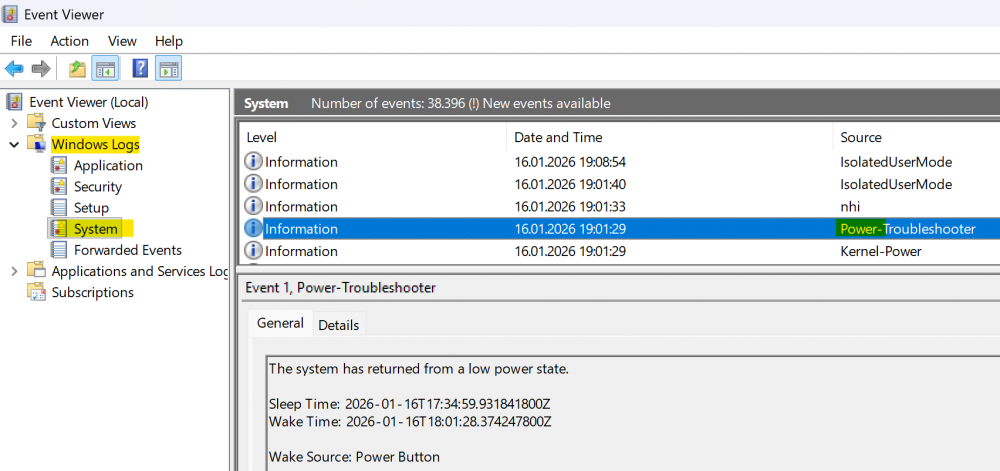
-
Hallo Griga, dank Dir kann man hier lesen wie ich bisher an meine DVB-C Senderliste gekommen bin, danke. Leider scheint das nicht mehr richtig zu funktionieren: In der angehängten Datei 'dvb-c_de_München-West_KDG.txt' gibt es keine TV-Sender der Kategorie "Digital Free" mehr, diese fehlen obwohl sie in der Web-Ansicht mit ausgewähltes Netz: München (West) Einstellungen: Welche Belegungen sollen angezeigt werden?: nur digital, alle Anzeige der SID, ... Digitalpakets?: Programmnummer, Sprache und Digitalpaket In welchem Zahlensystem sollen die PIDs sein?: dezimal Sollen Feeds, Datenkanäle und Tests angezeigt werden?: Ja da sind: https://helpdesk.vodafonekabelforum.de Ich habe keine Idee ob ich dieses mal etwas falsch gemacht habe (mehrfach, auch mit anderen Einstellungen:, versucht) oder das Ganze Leider nicht mehr funktioniert. Hast Du oder ein anderer Leser eine Idee / Vorschlag? Vielen Dank! dvb-c_de_München-West_KDG.txt
-

Access Violation and missing LCN during "Scan All" with Terratec Cinergy T2
AndreaB replied to AndreaB's topic in DVB Hardware (Digital TV cards)
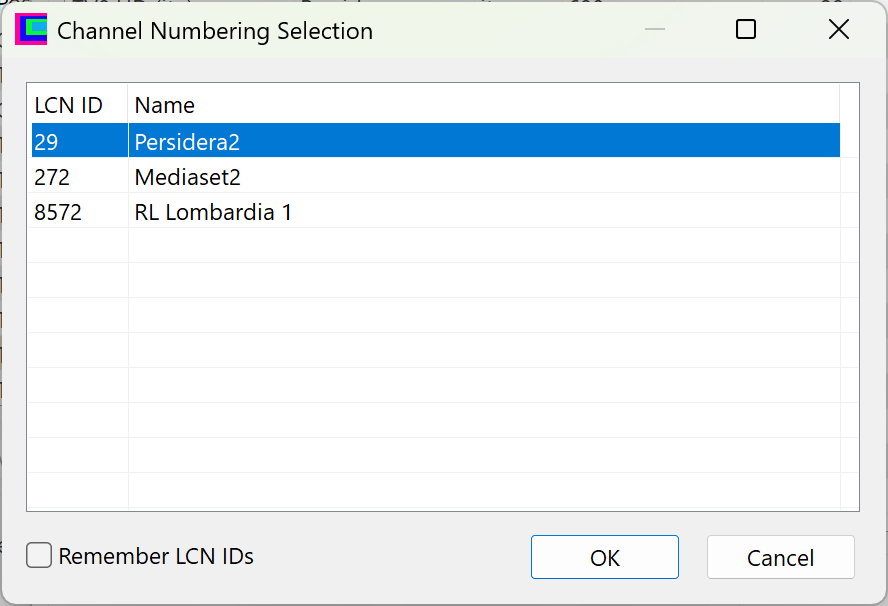
You can download the captured data stream here: https://www.swisstransfer.com/d/c34e8250-62e5-49c8-b86b-edf8d8f44aed (I requested more storage space specifically to attach images like the two below, as the system is notifying me that I have run out of available space). With the new version, the error no longer occurs, but: For the two problematic transponders (frequencies 674 and 690), once the individual scan finishes, a 'Channel Numbering Selection' window appears. In the list, only the Provider name is shown (29 is the ONID number). This consistently happens with frequency 690 and occasionally—mostly during the first scan—with frequency 674. After clicking OK, the LCN column is populated. If I run 'Scan All', the same window appears showing three Provider names; however, even after confirming with OK, the LCN column remains empty." Ciao, Andrea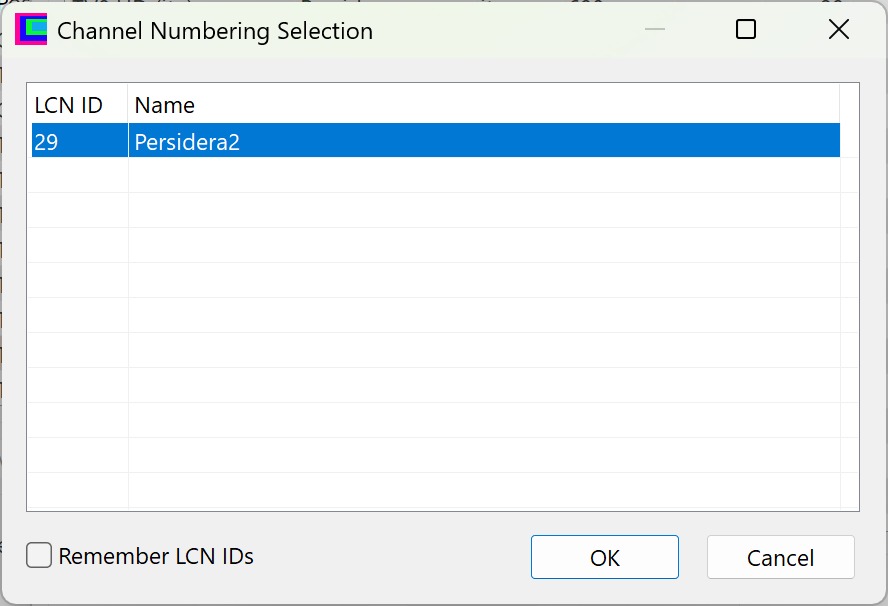
- Yesterday
-

Access Violation and missing LCN during "Scan All" with Terratec Cinergy T2
Griga replied to AndreaB's topic in DVB Hardware (Digital TV cards)
I think I have found the cause. There is something happening that TransEdit does not take into account, because usually it should never happen. A value stored as LCN ID is 0. This lets TransEdit use an uninitialised object and read data from the memory address 00000008, causing an access violation, of course. Please verify it with the test version, that I have provided as attachment of a personal forum message (PM) for you. It avoids the access violation, but only cures the symptom. Additionally it has to be investigated, how the LCN ID can become 0. For this I would need a recording from a transponder that triggers the error. Please proceed as follows: Select the transponder and click Analyze. Wait a bit until the PID list at the right of the Analyzer window is complete. Right-click the PID list and click "Select Main SI PIDs". Click Start Record (see Settings -> Analyzer -> Output Directory where the recording gets stored). Stop the recording after approx. 1 minute. Do you have web space where you can upload the recording? If not, you can use WeTransfer and send me the download link as PM. - Last week
-
Access Violation and missing LCN during "Scan All" with Terratec Cinergy T2
AndreaB replied to AndreaB's topic in DVB Hardware (Digital TV cards)
Hi Griga, I performed a single scan for all individual transponders, and the scan was successful for the first 9 with a usable signal. However, an error consistently occurs with the last two frequencies that have a signal: 674,000 kHz and 690,000 kHz. If I disable the option 'Scan NIT, BAT, and VCT...', the problem does not occur. I managed to resolve the issue for the 674,000 kHz frequency by increasing the 'PAT Timeout' to 6500. As for the 690,000 kHz frequency, I haven't found a PAT value or any other setting that prevents the error. I checked the Analyzer and all the indicated values (packet counts) are increasing. This suggests that the stream is being received, yet the LCN remains missing and the error persists during a standard scan. Ciao, Andrea PS: Is it possible to have a little more space for attachments? I have to keep deleting old images to post new ones, but the old ones might still be useful... TransEdit.ini
-

PC Wakes But Recording Doesn't Happen
Shaun White replied to Shaun White's topic in DVBViewer Media Server
Hi Griga, I did as you said and last night, the PC woke up on time and started recording on time so - so far so good. That was just one timer though. I will add some more timers over the next few days and report back on how it's gone and add the latest log for you to take a look at if that's ok. -
DVBViewer Download Retry Funktion bei Installation
Griga replied to Joshua2go's topic in Vorschläge & Ideen
Verstehe. Und du hast das so eingstellt, dass standardmäßig ausgehende Verbindungen blockiert werden bzw. eine Bestätigung brauchen, außer vielleicht bei bestimmten Programmen wie deinem Browser, die als Ausnahme deklariert sind. Aber da du weißt, dass das mit dem DVBViewer / Media Server Installer Probleme gibt, kannst du für diese auch Ausnahmen eintragen, richtig? -
Access Violation and missing LCN during "Scan All" with Terratec Cinergy T2
Griga replied to AndreaB's topic in DVB Hardware (Digital TV cards)
Rather looks like a TransEdit bug, not hardware or driver-related. Please attach your TransEdit.ini, so I can see your settings. In theory there should be no difference to scanning a single frequeny. Maybe due to a transponder close to the end of the list? -
Hallo, heute morgen war mein Rechner aus. Weshalb er heruntergefahren ist, ist mir rätselhaft. Bei einem 'normalen' Absturz wäre er von selbst wieder neu gestartet. Nach dem Neustart ging beim DVBViewer Pro der DVB-T2 HD Empfang nicht mehr: Kein Bild, kein Ton. Beide Empfangssticks (Astrometa und August) wurden in den Hardware-Einstellungen so wie immer angezeigt. Beim DVBViewer GE mit eigenem Astrometa Stick hat alles wie normal funktioniert. Mehrfache Neustarts vom Pro und vom Rechner haben keine Abhilfe gebracht. Schließlich habe ich es mit einem sauberen Shutsdown bzw. Neustart probiert: shutdown /f /s /t 0 Danach hat beim Pro alles wieder problemlos funktioniert. Viele Grüße Webturtle
-
Access Violation and missing LCN during "Scan All" with Terratec Cinergy T2
AndreaB posted a topic in DVB Hardware (Digital TV cards)
Hi everyone, I am experiencing an issue with the latest version of TransEdit and my Terratec Cinergy T2 stick. The problem occurs during the scanning process: If I scan a single frequency (or just 2-3 of them), everything works perfectly: the scan finishes correctly and the LCN column is fully populated. However, when I perform a full scan (Scan All), the software throws an "Access Violation" error (see attached image). This is followed by a blank "Channel numbering selection" window, and once the process is over, the LCN field is empty for all channels. Troubleshooting already performed: I am using the latest available drivers for the TV card. I have already tried increasing the PAT, SDT, and PMT Timeout values to 8000 ms, but the issue persists. Has anyone encountered this "Access Violation" during full scans, or is there a specific setting I should look into to fix the LCN detection? Thanks in advance for your help! Andrea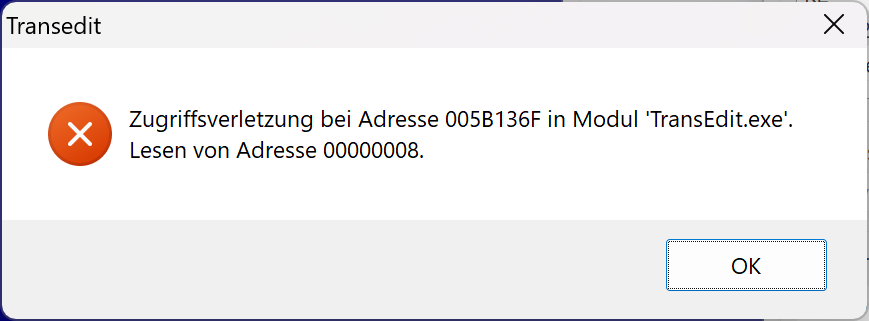
-

DVBViewer Download Retry Funktion bei Installation
Joshua2go replied to Joshua2go's topic in Vorschläge & Ideen
Hallo, ich verwende die normale Firewall von Windows, die mit mit der Grafischen Oberfläche von Windows10firewallcontrol bedient wird. Das Verwenden von Windows10firewallcontrol bedeutet für mich wieder ein bischen mehr Sicherheit, indem das nachladen von möglicher Schadsoftware unterbunden wird. Also ich würde den Download von der Zusatzsoftware in der Windowsfirefall mit dem Programm freigeben, dann müßte nur der Downloadmanager für die Zusatzsoftware vom DVBViewer nochmal den Download starten und alles wäre gut. Ich kann mir nicht vorstellen, das für eine Wiederholung des Downloads das ganze Programm umgeschrieben werden muß. Der MPC-BE Player hat dies so in seiner Installexe integriert. Funktioniert da Problemlos. Ich möchte Sie deshalb bitten, diese Funktion auch in Ihre Installexe zu integrieren. -

Im Fenster Aufnahme-Programmierung fehlt die Senderwahl (links)
SchauAN replied to SchauAN's topic in Allgemeines DVBViewer Pro/GE
Danke, das war's. Das Problem sitzt fast immer vor dem PC… -
DVBViewer Download Retry Funktion bei Installation
Griga replied to Joshua2go's topic in Vorschläge & Ideen
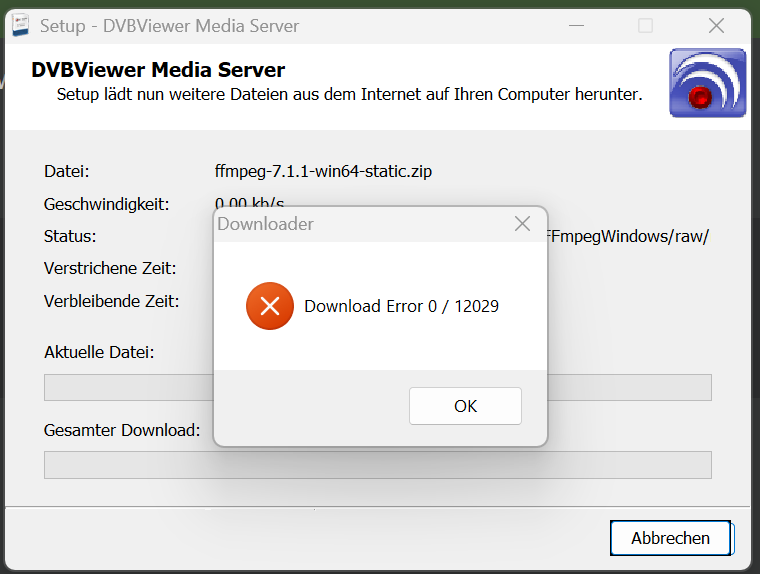
Wie kommst du darauf, dass eine Retryfunktion etwas nützen würde? Die Fehlermeldung stammt von der verwendeten WinInet Schnittstelle (ursprünglich die Basis für den Internet Explorer): https://learn.microsoft.com/de-de/windows/win32/wininet/wininet-errors und ich bezweifle, dass eine Wiederholung zu einem anderen Ergebnis führt. Die aktuelle FFmpeg-Version (und ältere) kannst du auch hier herunterladen, dann ffmpeg.exe extrahieren und im DVBViewer/Media Server Programmordner speichern. Du könntest auch auf deine Software-Firewall verzichten oder sie vorher deaktivieren. IMO sind die Firewalls im Router und von Windows im Normalfall absolut ausreichend. Ich sehe deshalb nicht ein, warum ich Arbeit investieren sollte, um die von zusätzlichen Software-Firewalls verursachten Probleme zu lösen. -

Fehlfunktionen nach Energiesparmodus (Win 10 pro)
ABerger replied to ABerger's topic in Fehlermeldungen DVBViewer Pro/GE
Ach so ja, die fehlende Signatur im Setup... ich dachte die Prüfung wird umgangen, wenn der Pro Downloader verwendet wird. Jedenfalls stimme ich den Kommentaren im verlinkten Thema voll zu, man sollte nicht jeden Quatsch von MiSo & Co mitmachen, die IT-Riesen sind schon längst zu übergriffig! Verzichtet halt auf die Signatur, das geht bestimmt auch anders. (Sprach der Laie, und der Fachmann wundert sich... 😉) Das wäre doch ein kleiner Beitrag zur Ablösung von der US-Hegemonie, die zurzeit überall diskutiert wird. Und die betrifft ganz besonders die IT-Branche...! Geradezu unfassbar, dass ein Privatunternehmen darüber entscheidet, wie die ganze Welt zu funktionieren hat. Gäbe es einen Knopf, um das abzustellen, ich würde als Erster drücken... 😉 -
Hallo, da ich meinen PC mit einer Softwarefirewall ausgestattet habe und diese bei Installation von DVBViewer, immer den Download der Zusatzprogramme verhindert, wollte ich fragen ob man im Installationsprogramm eine Retryfunktion für den Download einbauen könnte. Würde mich freuen. Mit freudlichen Grüßen Joshua
-
Im Fenster Aufnahme-Programmierung fehlt die Senderwahl (links)
Griga replied to SchauAN's topic in Allgemeines DVBViewer Pro/GE
Rechtsklick in die Timerliste -> Senderliste anzeigen. Wahrscheinlich hast du irgendwann versehentlich den Tastenbefehl Strg+H für diese Einstellung gedrückt. -
Im Fenster Aufnahme-Programmierung fehlt die Senderwahl (links)
SchauAN replied to SchauAN's topic in Allgemeines DVBViewer Pro/GE
Support nachgereicht. Bitte verschieben, wenn es hier falsch sein sollte. DVBV 7121 support 13.01.26.zip -
Im Fenster Aufnahme-Programmierung fehlt die Senderwahl (links)
SchauAN posted a topic in Allgemeines DVBViewer Pro/GE
aber warum? Einstellungsfehler? Es war mal da, aber nun fehlt es. Alles andere läuft völlig problemlos seit Jahren. Die identische Version drüberinstallieren bringt nichts. Ist das nur ein Einstellungsfehler von mir? DVBV 7.1.2.1 -
It is most likely caused by repeated attempts to record one or more non-working internet radio channels. There are a lot of "SetTuner failed" entries in your svcdebug.log. Probably the radio server does not reply, for whatever reason, so the tuning procedure waits until the connection timeout has elapsed (default 5000 milliseconds, see settings of your TS Stream devices). During this time the Media Server is not able to respond to other requests. It becomes a permanent issue, because the recorder tries again and again to start a recording of this channel, until the timer end time is reached. There are two measures that have to be taken. One is up to you, the other one up to me: You need to clean up your timer list and make sure that it only contains timers for radio channels that are working reliably. I have to think about measures that avoid such uselessly repeated recording attempts, e.g. by letting the recorder give up after a certain number of failed attempts, or retry tuning only once per minute. I will let you know as soon as I have a solution for it...
- 1 reply
-
- 1
-

-
Fehlfunktionen nach Energiesparmodus (Win 10 pro)
Griga replied to ABerger's topic in Fehlermeldungen DVBViewer Pro/GE
https://www.dvbviewer.tv/forum/topic/81328-browser-für-weitergehende-infos-im-epg-fenster-ändern/#findComment-535551 -
Fehlfunktionen nach Energiesparmodus (Win 10 pro)
ABerger replied to ABerger's topic in Fehlermeldungen DVBViewer Pro/GE
Mit Verspätung vielen Dank für deine viele Mühe! Nun hab ich es wohl auch verstanden: Zuerst die Beta-Version von ../members laden, dann deine ZIP im Programmordner entpacken. Ich kann mich dazu nur nicht aufraffen, übrigens auch weil ich grundsätzlich nie Betas installiere... (außer ich will dringend was Neues, aber so war es ja nicht...) Das hätte ich besser vorher erklärt, tut mir leid. Dennoch eine Frage dazu: Wann wird eine Beta- zur Hauptversion? Die aktuelle ist ja nach wie vor 7.3.1.0 -- daher auch kein roter Hinweis im Hilfe -> Infofenster... (danke für diesen Hinweis, werde fortan dort nachsehen! 😉). Warten Entwickler in dem Fall einfach die Rückmeldungen ab, und wenn keine 'Beta-Klagen' kommen, wird die Neuversion offiziell gemacht? Danke nochmal & im Voraus... ! 😉 -
I have following setup: Windows 10. MediaServer 3.3.1.0. Local Digital Devices Max S8 tuner to record DVB-S streams. Several TS Stream Device recording Internet radio. At any given time, about 40 timers programmed, simultaneously recording ~10 channels: DVB-S and Internet. The interface is sluggish, clicking on any tab (Timeline, Timers, Status, Configuration) takes >= 10 seconds to load. Sometimes freezes are much longer. Recordings seem to be unaffected, we see they come in time. The CPU stays at ~2.5% and memory usage at 180 MB. I don't see memory increase. The issue seems to be similar to my previous issue: https://www.DVBViewer.tv/forum/topic/74183-mediaserver-web-interface-extremely-sluggish/ but I tried deleting SvcDatabase.db3 and no change. Also, no elevated CPU and memory usage. support.zip
-
PC Wakes But Recording Doesn't Happen
Griga replied to Shaun White's topic in DVBViewer Media Server
You have a PM. The forum software should notify you about it. The simulation of a long delay in the Media Servers sleep/hibernate mode preparations causing the issues reported by you revealed a disaster. Several parts of the Media Server remained in an inoperable state after waking up from sleep mode: Timers, UPnP, RTSP Server, Media Stream Server (responsible for media file delivery)... only the Web Server and Live Stream Server were still usable. What I did in the test version: Changed the close down process after receiving a Windows PBT_APMSUSPEND for some Media Server parts (RTSP server, Media Stream server). Previously they were shut down completely, while the Web Server and Live Stream Server, which "survived" the disaster, only disconnected all clients, but remained available. Now the Media Server handles the RTSP and Media Stream Server in the same way. Maybe this also shortens the preparation time, so the Windows limit is no more exceeded (to be verified). However, this may also cause unknown side effects. Changed the "Sleeping Flag" handling, assuring that it is set before falling asleep and reset after waking up, so necessary reactivations are executed (UPnP, timer handling). I hope this generally makes the Media Server more robust, even if the Windows time allotment still expires before all sleep/hibernate preparations are done. Please try... -
Fehlfunktionen nach Energiesparmodus (Win 10 pro)
Griga replied to ABerger's topic in Fehlermeldungen DVBViewer Pro/GE
Du hast eine persönliche Forumnachricht (PM). Im DVBViewer Hilfe -> Info. Gilt allerdings nur für Hauptversionen, nicht für Betas. Z.B. in der 7.3.0 erscheint dort in roter Schrift "Neues Update verfügbar".