
All Activity
- Yesterday
-

Nach Sendersuchlauf nicht alle Sender empfangbar - Meldung "Für diesen Sender ist kein passendes DVB Gerät verfügbar"
Er_Sie replied to Er_Sie's topic in Allgemeines DVBViewer Pro/GE
Heureka !!! Problem gelöst Nachdem ich den Tuner, an dem kein Sat-Kabel angeschlossen war deaktiviert habe, läufts !!! Vielen vielen Dank !! Grüße -
 Nie im Leben. Nach dem ersten "Geräte suchen" stehen standardmäßig erst mal alle Tuner auf "Verwenden ein", und dass die Digital Devices Satelliten-Tuner DVB-S2 empfangen können, weiß der DVBViewer und setzt den Haken entsprechend. Das steht nämlich in seiner Hardware-Datenbank. Sind beide Satelliten-Tuner an Antennenkabel angeschlossen? Falls einer nicht, ist es richtig, diesen auf "Verwenden aus" zu setzen, vor allem wenn er an oberster Stelle in der Geräteliste steht, weil ihn der DVBViewer mit Vorrang benutzt, also dann einen Tuner, der gar kein Signal bekommt.
 -
Nach Sendersuchlauf nicht alle Sender empfangbar - Meldung "Für diesen Sender ist kein passendes DVB Gerät verfügbar"
Er_Sie replied to Er_Sie's topic in Allgemeines DVBViewer Pro/GE
Also ich habe da nirgendes rumgeklickt "ohne wirklich zu wissen was ich tue" 😁, das waren die Default-Settings -> Trotzdem Danke für die Mühe beim Debuggen !!! Nachdem ich die entsprechenden Einstellungen unter "Optionen" geändert habe, war jetzt wenigstens der Sendersuchlauf erfolgreich, die gefundenen Sender entsprechen dem was ich erwartet habe. Komischerweise habe ich aber kein Bild und kein Ton ( bei jedem Sender). Gestern , bevor ich die Einstellungen bzgl. "Tunertyp DVB-S2" und "Gerät verwenden aus" geändert hatte, konnte ich wenigstens einige Sender sehen und auch hören. Die Einstellungen waren schon so wie beschrieben, ich muste hier gar nichts ändern. Irgendwie beschleicht mich hier das Gefühl dass ich ein ganz anders Problem habe, bei meiner vorherigen Karte hatte ich die gleichen Symtome, kein Bild, kein Ton. Daher habe ich mir ja eine neue Karte gegönnt :☹️ support.zip -
I think it's a problem with the CI and CAM not working properly together. Check the DVBViewer Filter property page. Does it display an increasing number of discontinuities? If yes, the stream received by DVBViewer is already disturbed.
-
When I connect the cam to the device, all the open channels appear distorted. Is the problem with the filters, where is the problem?
-
Suddenly cannot open youtube live on DVBViewer
Griga replied to jactkwn's topic in General DVBViewer Pro/GE
At the moment it is a bit confusing, because it is still under development. Finally it comes down to a DVBViewer plugin, that enables DVBViewer to use the capabilities of yt-dlp to play streams and videos provided by Youtube and other sites. However, in this context the task of yt-dlp is not to download videos, but to provide URLs that are usable for DVBViewer. Basically this means, you have to store yt-dlp.exe in the DVBViewer program directory and the plugin yt_dlp_server.dll in the Plugins sub-directory. Then you have to create DVBViewer channel list entries belonging to the TS Stream type with adresses like http://localhost:5077/x.m3u8?url=https://www.youtube.com/watch?v=YDvsBbKfLPA (this is for Sky News). It is also possible to play MP4 videos (see my post above), requiring LAV Filters to be installed. Additionally you should use the latest DVBViewer Beta, because it is used for testing the plugin. Currently this works out of the box. Nevertheless you should be well informed about how yt-dlp must/can be configured for achieving certain results, e.g. regarding this. The plugin yt_dlp_server.dll is not officially available yet. I could invite you to participate as tester in a private forum conversation where the DLL can be downloaded, if you want. But please note that it is no plug 'n play thing. You should be informend, read and understand my post above, and know what you do. -
Das DVBViewer.log macht deutlich, warum der Scanner nur einen Teil der Frequenzen abgrast. Abgesehen davon, dass der DVBViewer eigentlich gar nicht direkt auf die Digital Devices Karte zugreifen sollte, wenn der Media Server installiert ist, ist deine Konfiguration unter Optionen -> Hardware reichlich konfus - irgendwie musst du da herumgeklickt haben, ohne wirklich zu wissen, was du tust. Unter Optionen -> Hardware gibt es bei dir im DVBViewer zwei Einträge: Digital Devices DVB-S2X Tuner 2. Dieser steht jedoch auf "Gerät verwenden aus". D.h. du hast dem DVBViewer verboten, ihn zu benutzen. Warum? Ist er mit keinem Antennenkabel verbunden? Digital Devices DVB-S2X Tuner 1. Diesen darf der DVBViewer benutzen, aber du hast aus unerfindlichen Gründen den Haken bei "Tunertyp DVB-S2" entfernt. Warum? Deshalb scannt der Suchlauf nur Transponder / Frequenzen, auf denen gemäß dem althergebrachten DVB-S Standard gesendet wird. Alle mit dem moderneren DVB-S2 Standard lässt er aus. Warum hast du den Media Server installiert? Weißt du überhaupt, wozu er gut ist und wie seine Zusammenarbeit mit dem DVBViewer funktioniert? Der richtige Umgang damit scheint dich zur Zeit noch zu überfordern. Deshalb wäre meine Empfehlung: Führe Hilfe -> Media Server Wizard nicht aus, sondern deinstalliere den Media Server und versuche erst mal, mit dem DVBViewer solo klar zu kommen. Du kannst den Server später erneut installieren, wenn du weißt, wozu er gut ist und was du tust. Falls du inzwischen den Media Server Wizard ausgeführt hast, musst du nach Deinstallation des Media Servers den DVBViewer wieder auf Solo-Betrieb zurückkonfigurieren, indem du unter Optionen -> Hardware die vom Wizard erzeugten RTSP Netzwerkgeräte löschst und die deaktivierten Digital Devices Tuner, die der DVBViewer verwenden soll, wieder auf "Gerät verwenden ein" setzt. unter Optionen -> DVBViewer Media Server "Unterstützung für den DVBViewer Media Server aktivieren" auf aus setzt.
- Last week
-

Nach Sendersuchlauf nicht alle Sender empfangbar - Meldung "Für diesen Sender ist kein passendes DVB Gerät verfügbar"
HaraldL replied to Er_Sie's topic in Allgemeines DVBViewer Pro/GE
Im DVBViewer-Menü: Hilfe -> Media Server Wizard sollte das für dich erledigen. Also die direkte Karte auf "nicht verwenden" umstellen und stattdessen RTSP-Verbindungen zum Media Server einrichten. -
Nach Sendersuchlauf nicht alle Sender empfangbar - Meldung "Für diesen Sender ist kein passendes DVB Gerät verfügbar"
Er_Sie replied to Er_Sie's topic in Allgemeines DVBViewer Pro/GE
Hallo , viele Dank erstmal für die Antworten, bin leider mit dem Problem nicht weitergekommen 1. Ich wurde nicht aufmerksam gemacht, dass es eine neue Transponderliste gibt 2. Die DVB-S_0192.ini entsprechend Vorgabe kopiert 3. Suchlauf neu gestartet, gleiches Problem( siehe Screenshot, Suchlauf bricht ungefähr bei der Mitte ab) 4. Das mit dem MediaServer verstehe ich nicht . Was mus ich dort eintragen um alles richtig zu konfigurieren ? Vielen Dank vorab support.zip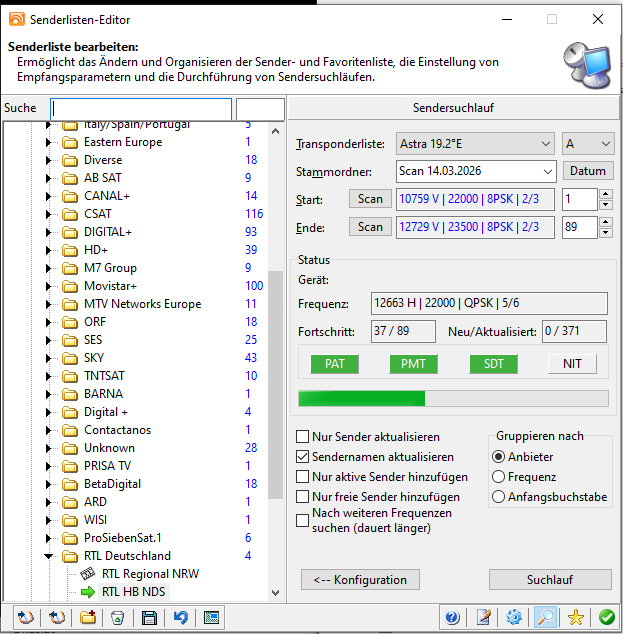
-

Suddenly cannot open youtube live on DVBViewer
jactkwn replied to jactkwn's topic in General DVBViewer Pro/GE
So how should I open Youtube live link now? -
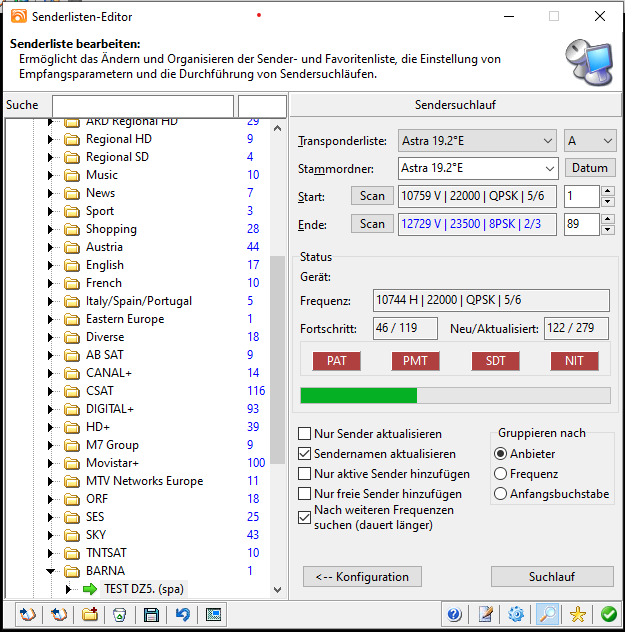
Offenbar verwendest du auch eine veraltete Transponderliste für den Suchlauf. Dass im Screenshot beim Transponder 10744 H alles rot bleibt, ist kein Wunder. Den gibt es inzwischen nicht mehr. Hat dich der DVBViewer nicht darauf aufmerksam gemacht, dass es eine neuere Transponderliste gibt und dir angeboten, diese zu verwenden? Du findest die aktuelle in C:\Program Files (x86)\DVBViewer\Default\Transponders\DVB-S_0192.ini Diese kannst du auch manuell nach C:\ProgramData\CMUV\DVBViewer\Transponders kopieren, um sie zu verwenden. P.S. Korrektur: Es kann auch daran liegen, dass du "Nach weiteren Frequenzen suchen" angehakt hast. Womöglich wird auf irgendeiner anderen Frequenz 10744 H noch als aktiv angegeben, und das hat der DVBViewer dann erfasst und ergänzt. Was in deiner support.zip fehlt: Das DVBViewer.log, weil du das Problem vor der Erzeugung nicht wie empfohlen vorher im Debug-Modus des DVBViewers reproduziert hast.
-
Du hast den DVBViewer nicht für die Zusammenarbeit mit dem Media Server konfiguriert. Beide greifen direkt auf die DD Hardware zu. Das kann zu Konflikten führen. Als Media Server-Client darf der DVBViewer Tuner nur über den Media Server, d.h. über virtuelle RTSP (Sat>IP) Netzwerk-Geräte benutzen. Führe im DVBViewer Hilfe -> Media Server Wizard aus, um das zu beheben.
-
Hallo zusammen, ich habe meinem Rechner eine neue TV-Karte gegönnt nachdem meine alte Hauppauge es nicht mehr so richtig wollte. Die Wahl fiel auf eine DigitalDevices MAX M2 V1. Die Einrichtung und Installation hat eigentlich ganz reibungslos funktioniert. Allerdings hat der Sendersuchlauf für Astra 19,2E nicht so gut funktioniert. Scheinabr findet der Suchlauf nicht alle Sender , vorallem die öffentlich Rechtlichen wie ARD ZDF usw werden nicht gefunden. Der Suchlauf bricht immer bei ungefähr der Hälft ab. Scheinbar habe ich etwas übersehen oder falsch eingestellt. Vielleicht kann jemand helfen ? Vielen Dank im Voraus ? support.zip
-
All channels appear blurred and green... When the camera is installed on the device
-
Suddenly cannot open youtube live on DVBViewer
Griga replied to jactkwn's topic in General DVBViewer Pro/GE
After rethinking the matter I found a much better solution for the yt-dlp server plugin. It doesn't use the search.m3u8 mechanism anymore, but a HTTP mechanism called "Redirect". Please read more about it here. If a DVBViewer request like http://localhost:5077/?url=... arrives in the plugin, its HTTP server replies with a "302 Found" HTTP header, that looks like this: HTTP/1.0 302 Found Location: <here the URL received from yt-dlp> Content-Length: 0 Server: yt-dlp plugin ... other header fields This header tells DVBViewer "The URL of the desired content has been changed. Please use the URL in the location header". DVBViewer is able to handle such a redirect since version 6. Doing it this way is faster than using the search.m3u8 mechanism, and it's more versatile. It is possible to play MP4 videos in this way with current DVBViewer versions, not requiring a new version anymore. However, URLs with search.m3u8 in the channel list will not work anymore. URLs can now simply look like this: http://localhost:5077/?url=... or, if you want to help DVBViewer and tell it which format it has to expect, in this way http://localhost:5077/x.m3u8?url=... or http://127.0.0.1:5077/x.mp4?url=... where the "x" is irrelevant (it can be as well y or z or abc...), and the file extension .m3u8 /.mp4 indicates that a HLS / MP4 stream will be received. This lets playback start faster, because DVBViewer can select the suitable playback branch immediately, without having to try this and that first. Other enhancements in the plugin are : A cache that remembers the results obtained from yt-dlp for the URLs requested by DVBViewer. So if DVBViewer requests the same URL once more, the plugin does not need to ask yt-dlp again, but simply picks the URL from its cache. This is much faster. However, since the URL may have an expiration date, it is discarded from the cache after a configurable time (default 5 minutes). The plugin writes a file yt_dlp_server.ini to the Plugins sub-directory of the DVBViewer configuration directory, where the following values can be configured: Port (default = 5077). Here you can also see if the plugin has changed the port automatically because 5077 was occupied. YT_DLPCommand (default = yt-dlp.exe -g -f b). Here you can change the command parameters passed to yt-dlp. URLValidity (default 5 minutes). Here you can change how many minutes URLs in the cache remain valid. That's all for now - more enhancements may follow... @Iks Brasil You have another PM. -
The CAM seems to corrupt the TV stream received by DVBViewer. Is the "Encrypted" checkbox for this channel checked in the DVBViewer Channel Editor? The stream of a channel that is not flagged as encrypted should not pass through the CAM.
-
Balqan to reduce RAM usage (DVBViewer optimiz (by DDv122 & ABDUL) For Windows 11
Griga replied to الهاوي's topic in DVBViewer Media Server
For DVBViewer RAM usage? No. Don't use tools that promise RAM usage reduction in Windows. Usually the effect is bad. Please use the normal font when writing in the forum. Don't use large fonts or special colors. -
The picture is here and the CAM is not installed on the device... The picture is fine and there are no problems with it The picture is here, and the CAM is connected to the satellite card. I find the picture breaking up, and there's a green color overlay on it. Where is the problem here?
-

Balqan to reduce RAM usage (DVBViewer optimiz (by DDv122 & ABDUL) For Windows 11
الهاوي posted a topic in DVBViewer Media Server
Is there a plugin to reduce RAM usage (DVBViewer optimiz (by DDv122 & ABDUL) for Windows 11 -
Suddenly cannot open youtube live on DVBViewer
Griga replied to jactkwn's topic in General DVBViewer Pro/GE
OK, thanks for testing. In the meantime I also managed to make it work with search.mp4 URLs for playing MP4 videos. However, this requires additional code in DVBViewer (which means, a new version), and it revealed a problem in the plugin. It captures the whole yt-dlp output to stdout. The output may also contain warnings. Therefore the plugin searches for http in the output to find the URL determined by yt-dlp. Unfortunately the warnings may also contain URLs, and that's where the plugin goes wrong. The solution was to let the plugin only capture the last line of the yt-dlp output. Furthermore I only got a low-resolution version of the MP4 test video, though it is also available in full HD. This is probably due to my yt-dlp configuration. I didn't install a JavaScript runtime, as recommended. Something that should already work with current DVBViewer versions and the plugin are URLs like http://localhost:5077/search.mpd?url=... for playing streams in MPEG Dash format (untested). The plugin still needs to be elaborated a bit. An already occupied port 5077 should be handled somehow, e.g. by automatically searching for the next free port and writing it to a file yt_dlp_server.ini in the Plugins sub-directory of the DVBViewer configuration folder. I'll provide an update for you via PM, when it's done, or upload it to the members area, so it becomes available for all DVBViewer users. -

Suddenly cannot open youtube live on DVBViewer
Iks Brasil replied to jactkwn's topic in General DVBViewer Pro/GE
Good afternoon. It worked perfectly; it just took a few extra seconds… but it worked perfectly. -

Information zu Interlacing in der Statusleiste
Bob.Dig replied to Bob.Dig's topic in Vorschläge & Ideen
Ich würde es drauf ankommen lassen wollen. Meistens sehe ich das (Unheil*) direkt und will mich dann nur noch vergewissern, ob mich nicht der Schein trügt. *Unheil ist dann meistens, dass mit 25 progressiven Frames gesendet wird (bei vielen "Internet"-Streams), was mich regelmäßig 🤮, aber das ist ein anderes Thema. -
Information zu Interlacing in der Statusleiste
Griga replied to Bob.Dig's topic in Vorschläge & Ideen
Ja, das geht. Eine andere Frage ist, inwiefern die Information zutreffend ist. Sie entstammt i.a. dem in der Kette der Wiedergabekomponenten verwendeten Source Filter oder Splitter. Das kann auch ein anderer sein als der DVBViewer Filter. Ob das immer richtig ermittelt und durchgereicht wird, habe ich nicht näher untersucht. -
Suddenly cannot open youtube live on DVBViewer
Griga replied to jactkwn's topic in General DVBViewer Pro/GE
Well, it was easier than I thought, because I found a Delphi module for launching external applications, that also enables receiving their stdout Output (used by the DVBViewer Media Server for communication with FFmpeg). So I only had to change some things in the WiFi Remote Input Plugin. Here the result works for .m3u8 URLs. You can try... check your personal messages. -
Suddenly cannot open youtube live on DVBViewer
Griga replied to jactkwn's topic in General DVBViewer Pro/GE
No, there isn't. It could be implemented, but enabling something like this is a potential security risk. I suppose what you want is some kind of channel list entry in DVBViewer, that launches the whole process that is necessary for passing an URL to yt-dlp, getting the stream URL from it, passing it to DVBViewer and let it play the stream. However, I see no possibility to launch external executables with the current DVBViewer version. The search.m3u mechanism would require a HTTP server running locally all the time in the background, while DVBViewer is running. Let's assume 5077 as its port. It would have to do the following Receive a request from DVBViewer, something like http://localhost:5077/?url=https://www.youtube.com/watch?v=YDvsBbKfLPA. The original URL in the DVBViewer channel list would be http://localhost:5077/search.m3u8?url=https://www.youtube.com/watch?v=YDvsBbKfLPA. However, search.m3u8 is not sent to the server. It only tells DVBViewer that it shall search for an m3u8 URL in the server response. Pass the part after ?url=... to yt-dlp and read the URL created by it. Send this URL as response to DVBViewer, enclosed in single or double quotes ('url' or "url"). DVBViewer will now search in the server output for an URL containing .m3u8 and play it. That would work. I don't know if it is possible to create such a server with Python. I could also try do it in Delphi (maybe even as a DLL loaded as plugin by DVBViewer), which would be some work, but I already have templates like the server in the WiFi Remote Input Plugin. That makes it a bit easier. The hard part will be reading the yt-dlp output from stdout. I first have to find out how this can be done in Delphi.