All Activity
- Today
-
Hallo! Vodafone sortiert mal wieder die Kabelfrequenzen um, bei mir am 5. Mai. Reicht es danach, einen neuen Sendersuchlauf zu starten, oder muss man sich die neue Belegung im Vodafone-Kabelforum runterladen? MfG Walter
-
Final & Best result for VDR: bold = fe ... 0xDF = this Magic Code for best picture and minisatip run 2 tuner as service: 2:0:0 = tuners 3@192.168.100.6:554 = fe ...
-

Video Buffer Overflov bei RTL UHD >> Abhilfe ??
intell replied to intell's topic in Allgemeines DVBViewer Pro/GE
Entschuldigung >> Radiofenster meinte ich deinen Audioplayer Mit diesem Laptop hat das alles einmal perfekt funktioniert, das letzte war das FB Match DE _ Swiss, ich scha ja nicht oft UHD, ist mir eben erst heute aufgefallen, das dieser Fehler mit dem LAV Filter zu tun hat, war reine Vermutung, schönen Feiertag noch !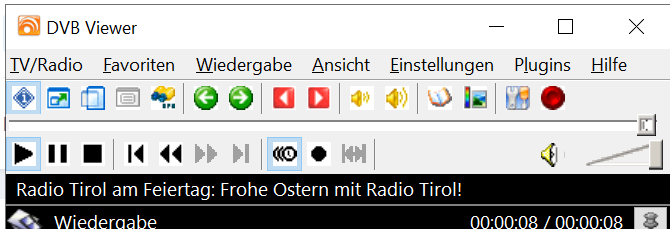
-

Video Buffer Overflov bei RTL UHD >> Abhilfe ??
Griga replied to intell's topic in Allgemeines DVBViewer Pro/GE
Hä? Was für einen Radio Player? Und was heißt "wieder wie vorher"? Poste so, dass es für mich verständlich und nachvollziehbar ist. -
Video Buffer Overflov bei RTL UHD >> Abhilfe ??
intell replied to intell's topic in Allgemeines DVBViewer Pro/GE
Danke Griga, das alleinige Umbenennen öffnet bei mit nur den Radio Player, wird kein Video erkannt. Hab den Lav Filter neu installiert (mit Reset ), dann geht wieder alles wie vorher. lg -
Video Buffer Overflov bei RTL UHD >> Abhilfe ??
Griga replied to intell's topic in Allgemeines DVBViewer Pro/GE
Habe das auch mit Intel UHD Graphics erlebt, mit der das eigentlich problemlos gehen sollte, weil sie HEVC hardwaremäßig dekodiert, aber mich nicht lange mit aufgehalten und kurzerhand eine NVidia Graka eingebaut. Mit der ging es dann. Probiere mal, ob es der DVBViewer die Aufnahme mit dem LAV Source Filter sauber abspielt. Benenne die Aufnahme einfach in .mp4 um, dann delegiert der DVBViewer das entsprechend. Der LAV Source Filter bzw. die verwendete FFmpeg-Engine erkennt trotzdem, das es .ts ist, und sollte den Dateiinhalt richtig interpretieren. -
Video Buffer Overflov bei RTL UHD >> Abhilfe ??
intell posted a topic in Allgemeines DVBViewer Pro/GE
Hab interessehalber den Pumukel in UHD geschaut und aufgenommen support.zip Frohen Ostermontag noch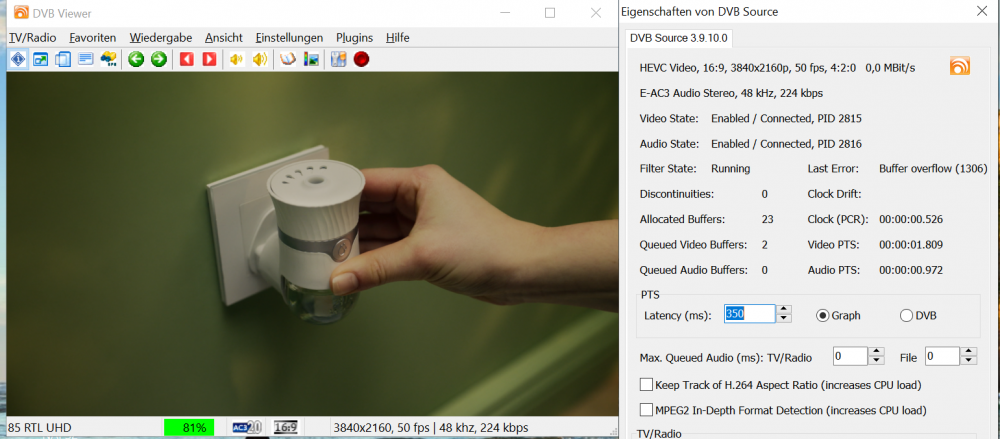
- Yesterday
-
Most likely yes. But it is untested.
-
fixed by full reinstall DVBViewer & DMS can i use ffmpeg 8.1 ? ffmpeg 8.1 Download Free - VideoHelp
- Last week
-
I have tried with Kuwait Radio 1 from Hotbird 13e 12399 H http://192.168.178.28:8089/upnp/master.m3u8?preset=HLS%20Mid%201200%20kbit&track=0&chid=4648314273717617558%7CKuwait%20Radio%201 No issue here. There were no changes in the Live Stream Server between 3.3.1.9 and 3.3.1.14. The issue happens here The access violation (forbidden memory access) is reported by the network library used by the Media Server. It actually happens in a Windows DLL (ntdll.dll) outside the Media Server code. Nevertheless it may be caused by the Media Server or a plugin. But I don't know why, because I cannot reproduce it.
-
same issue on v3.3.1.12 & v3.3.1.14 no issue on v3.3.1.9 i try now v3.3.1.14 this direct http = working fine but when try transcode hls: = not working here log svcdebug.log
-
Try it without plugins. Same problem?
-
@Griga v i have issue in transcode! any idea?
-

Radioempfang Klassik Radio gestört
StefanGPunkt replied to StefanGPunkt's topic in Allgemeines DVBViewer Pro/GE
Hey Moderator Griga... es entzog sich meinem Verständnis, warum der Empfang einfach so abbrach... siehe Dialog... dann bemerkte ich in den letzten Wochen im TV-Bild an meinen Geräten aufkeimende Klötzchenbildung.... nun habe ich soeben den LNB getauscht...und siehe da... alles läuft wie vorher inkl. Klassik-Radio, was ja eigentlich mein Problem war... Somit: Ursache gefunden und gelöst. Gute Ostertage ... -
The class names appearing in the log are TRTSPUDPClient for UDP TRTSPInterleavedClient for TCP (compatible with new DVBViewer versions, minisatip, tvheadend) TRTSPDVBViewerTCPClient for TCP (compatible with old DVBViewer versions) If your Media Server is in "Use Sat>IP frontend parameter as channel group" mode, it should be possible to use the fe parameter in minisatip for channel group selection. fe can be specified with -s so in your case something like -s 1@192.168.100.6 for letting minisatip use a tuner at 192.168.100.6 with fe=1 (channel group A). However, I have never tried this. For more information see here.
-
How do I find out the connection status tcp or udp in the log? Media Server client from DMS
-
Wrong setting. For forcing TCP you must select the according transport mode, not the operating mode. You are still on UDP, as the svcdebug.log shows. Minisatip as server or as Media Server client?
-
how apply channel group (fe=1 -> group A, fe=2 -> group B,....) for minisatip ?
-
ok, now my setting for force use TCP: #setup.conf: as here: https://github.com/rofafor/vdr-plugin-satip/blob/master/README and and load channel = no error keep Alive but still bad glitches & performance Log vdr svcdebug.log
-
You can try to switch the protocol from UDP to TCP, as you did in the beginning: This is called "Support for RTP over TCP" in the VDR Plugin Readme. It is also supported by the Media Server. Additionally configure Transport mode = rtp-o-tcp in the VDR setup menu (see plugin Readme). With TCP lost data packets are automatically sent again by the server. This prevents video and audio dropouts. However, another problems is the "keep alive" handling. It does not work well. In Sat>IP, the client must send "keep alive" messages to the server every x seconds. The Media Server wants to receive keep alive messages at least every 20 seconds. If a message does not arrive in time, the Media Server closes the Sat>IP session. If the client tries to use a closed session, the Media Server responds with status code 454 (Session Not Found). This happens often, as I can see in your svcdebug.log. But I don't know why. To find out more about it, we need logging of the arriving "keep alive" messages. I have created such a Media Server version. You have another PM.
- Earlier
-
ok, Now i test, and now group connect via fe=1 A & 2 B & 3 C, I've noticed that if I request a channel from 7w, the busy tuner is the one that switches to group B. Similarly, if I request a channel from 13e, it automatically goes to group C. However, the problem lies in the performance and frequent connection drops. I've tried several solutions, but the random disconnections persist. here my Setup: #Satip : /etc/vdr/conf.d/50-satip.conf (0xCF) = (0x01 + 0x02 + 0x04 + 0x08 + 0x40 + 0x80) cat /proc/sys/net/core/rmem_max 67108864 #Setup.conf #channel.conf here error code # log journalctl -u vdr -f For your information, all devices are connected via a 1000 Ethernet cable. Any suggestions? svcdebug.log
-
Wird mal wieder Zeit für ein Update. 268x200 mit Schatten: https://drive.google.com/file/d/1uHfj52dyqigelzjTLKzgr1yNoax_gjcs/view?usp=sharing 268x200 ohne Schatten: https://drive.google.com/file/d/1k-Fma-AhkfLHylbGWIyciPsEGvypFut1/view?usp=sharing 536x400 mit Schatten: https://drive.google.com/file/d/1qD6rBqJ0PyiFttyAAak-Vbl4_pGY4KAS/view?usp=sharing 536x400 ohne Schatten: https://drive.google.com/file/d/1f90YFw6bDxQDs_u1hMVAqSA81V9omtX4/view?usp=sharing 804x600 mit Schatten: https://drive.google.com/file/d/1XHFLl5Sgz4s8a-Cd_ETUWcJx-lG0_PVp/view?usp=sharing 804x600 ohne Schatten: https://drive.google.com/file/d/1CNiH4-fAIOHk4brkYMeViKcpevO8XeIP/view?usp=sharing und auf einzelnen Wunsch 48x48: https://drive.google.com/file/d/1ZEnjaU7ZbwelDufPS9ZgdRXRRL02rgpq/view?usp=sharing Viel Spaß damit.
-
OK, I have sent you a personal message with a Media Server 3.3.1.14 test version.
-
Thanks Griga, I'll work on the experiment, maybe in a couple of days. The holiday is over and I'm busy with work now. I'll write about my experience with the new version here soon.
-
This is now implemented in Media Server 3.3.1.14. Let me know if you want to try. Then you will get a beta test version as attachment of a personal message. With this new version, you first have to do the following: Stop the Media Server Start DMSTweaker.bat from the DVBViewer program directory. A window with expert settings appears In this window search for the "Use Sat>IP frontend parameter as channel group" checkbox Check it and save. Restart the Media Server Now the Sat>IP server uses frontend (fe) parameters sent by clients as channel group, not as device list index. This allows clients a tuner selection by channel group. fe=1 is mapped to group A, fe=2 to group B etc. up to fe=8 for group H. Please note that the VDR channels.conf file must now be configured differently than before. The last number must be replaced by the channel group number: For all 26e channels replace it by 1 (= group A) For all 7w channels replace it by 2 (= group B ) for all 13e channels replace it by 3 (= group C)