All Activity
- Today
-

Lokale Videos von letzter Position fortsetzen, auch in Wiedergabelisten
ABerger replied to ABerger's topic in Allgemeines DVBViewer Pro/GE
Hallo, nochmal kurz zum Thema der Sprache bzw. 'Lokalisierung' des Programms... Ich fand eben zufällig, auf der Suche nach Infos zur DVB-Empfangsqualität (außer dem Statusleisten-Balken, der immerhin grüne 92 % anzeigt ;-), im Menü 'Einstellungen > Filter' das Dialogfenster 'Eigenschaften von DVB Source' (v. 3.9.10.0). Dabei fällt mal wieder auf, dass alle Infos nur auf Englisch sind, was nicht für alle Benutzer verständlich ist (sogar für mich als Englisch-Übersetzer, wg. vieler Fachbegriffe)... Vermute ich richtig, dass solche Extras über Module anderer Hersteller (quelloffen oder lizensiert) in euren DVBViewer implementiert werden? Wenn intern entwickelt, hättet ihr doch wohl die deutsche Sprache benutzt... Darum will ich einfach mal anfragen, ob ihr evtl. Interesse habt, solche Module auf Deutsch zu lokalisieren? Ich selbst habe schon viele technische Sachen übersetzt und könnte mich ggf. in die Materie einlesen, um eine professionelle Sprachversion zu erstellen (in beliebigem Textformat). Würde mich freuen! 😉 Grüße aus Göttingen, A. B. -

DVBViewer Pro Beta 7.3.1.12 - sleep - I must restart computer (Windows 10)
Andrzej Sochon posted a topic in Bug Reports DVBViewer Pro/GE
Windows 10 Pro 22H2 DVB-T Hauppauge dualHD USB tuner DVBViewer Pro Beta 7.3.1.12 "After Recording" is set to SLEEP After finishing recording with SLEEP option wake up is not possible, I must restart my computer. Such phenomena does not exit with version 7.3.1.0 Kind Regards, Andrzej Sochon -
Nicht ganz tot. Ich habe mir für den neuen PC, in den mangels PCI-Slots meine alte Technotrend-Sat-Karte nicht mehr reinpasste, eine DigitalDevices MaxM2 gekauft. Die kann Sat, Kabel und Terrestrisch. Ist halt kein Billig-Fernost-Produkt.
- Yesterday
-
Also ich habe mal zum Spaß einen Sendersuchlauf für DVB-T durchgeführt. Es hat alles tadellos funktionert , Bild und Ton waren vorhanden . Aber DVB-S ist Tod. Ich vermute fast dass die Karte einen HW Defekt hat. Leider gibt es diese Karte nicht mehr zu kaufen, der Markt für TV-Karten scheint eh auch Tod zu sein.........
-
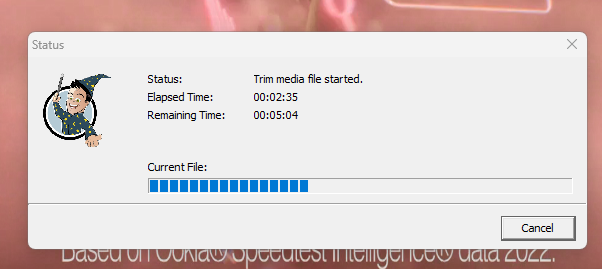
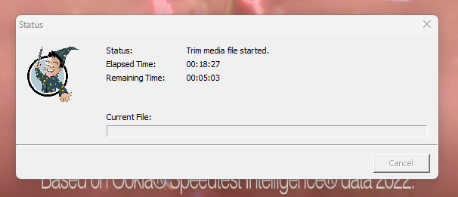
As the title suggests, Video Editor keeps freezing while part way through the saving process. This has happened twice, both HD .ts Is there a way of logging the process? Any ideas why this is happening? Seems to happen when the remaining time reaches 00.05.0x see attached images Frist time was using default filters and default renderers, second time I set all to LAV and it happened again
-
Hence my EDIT
-

Windows 11 DVBViewer Digital Devices CineS2 v7 Advanced nicht signierte Treiber
HaraldL replied to Herzog's topic in Einsteigerfragen DVBViewer Pro/GE
Ja der Key funktioniert aktuell. Auf meinem Hauptsystem Win11 25H2 (siehe Signatur) mit 2 DD-Karten und aktuellstem Treiber 3.1.4.329-x64-de kann ich SecureBoot eingeschaltet lassen und beide Karten funktionieren. Ohne den Registry-Key hatten die im Gerätemanager ein Ausrufezeichen und waren blockiert. Mal schauen wenn im Juni 2026 Microsoft automatisch die 2011er SecureBoot-Zertifikate als ungültig markiert und nur noch die 2023er gelten, ob es dann immer noch klappt. Keine Ahnung ob das auch die Treiber betrifft. Ansonsten schalte ich SecureBoot halt ab, hatte ich zwischendurch Monatelang auch so, bei privaten Rechnern ist das relativ egal. Außer man möchte Software einsetzen die das ausdrücklich verlangt. Hab gehört es soll z.B. neuere Computerspiele geben die nur mit aktiven SecureBoot laufen damit man keine Cheat-Treiber laden kann, betrifft mich halt nicht. -
TechnoTrend connect S2-3650 CI
HaraldL replied to الهاوي's topic in Questions about Plugins, AddOns & OSD-Skins
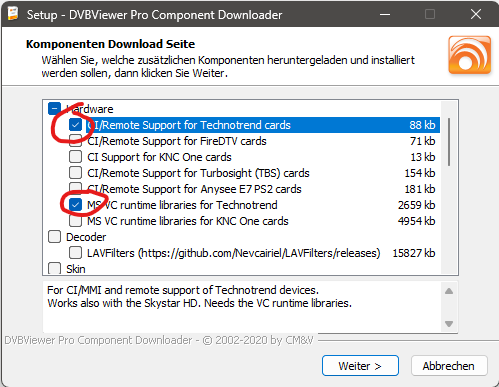
As @Griga wrote. Windows Start Menu -> DVBViewer -> DVBViewer Pro Downloader: and then select "CI/Remote Support for Technotrend cards" (MSCV Runtime below then should be selected automatically), With "Next" it's automatically downloaded and installed. Because you didn't select your "Technotrend card" on install where the selection above opens automatically during setup. Obviously on Windows 8 you did select it properly.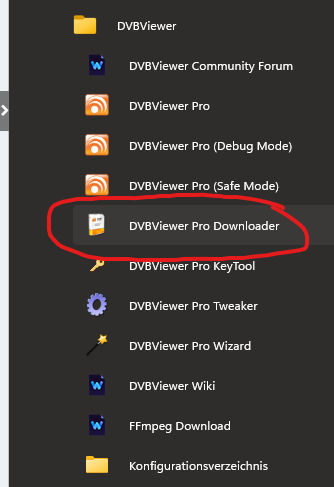
-

Windows 11 DVBViewer Digital Devices CineS2 v7 Advanced nicht signierte Treiber
Harrus replied to Herzog's topic in Einsteigerfragen DVBViewer Pro/GE
Ich hatte seit Mitte Januar 2026 plötzlichg das Problelm, auf Windows 11 bin ich schon im Herbst 2025 gewechselt. Der Registry-Key hat das Problem behoben! Vielen Dank! -

TechnoTrend connect S2-3650 CI
الهاوي replied to الهاوي's topic in Questions about Plugins, AddOns & OSD-Skins
Where did he get the file from..? Upload the file to the forum.. because I couldn't find it. Why doesn't it download DVBViewer programs? With all of it.. Windows 8 downloads all the program requirements. -

PC Wakes But Recording Doesn't Happen
Shaun White replied to Shaun White's topic in DVBViewer Media Server
Thanks Griga. I'm going to try increasing the lead time. I'm now particularly annoyed though. In my quest for perfection, I decided to buy another motherboard and rebuild the PC. It's still a B760M chipset but this time from Asus (the otherone was from Gigabyte). This was a week ago. I thought things were going well until I checked last nights records and what do you know, a few minutes late again. I'm wondering now if it's some issue with this chipset now? It's too coincidental. Hopefully if I increase that extra lead time it will compensate for these errors with the PCs. -

TechnoTrend connect S2-3650 CI
Griga replied to الهاوي's topic in Questions about Plugins, AddOns & OSD-Skins
-
TechnoTrend connect S2-3650 CI
الهاوي replied to الهاوي's topic in Questions about Plugins, AddOns & OSD-Skins
ttBdaDrvApi_Dll.dll This file is missing... Can you upload this file to the forum or send me a download link? And in which folder should it be placed? -
TechnoTrend connect S2-3650 CI
Griga replied to الهاوي's topic in Questions about Plugins, AddOns & OSD-Skins
The file ttBdaDrvApi_Dll.dll is required for the TechnoTrend connect S2-3650 CI remote control to work. Is it present in your DVBViewer program directory? If not, you can install it by using the DVBViewer Pro Downloader (see Windows start menu -> DVBViewer) or DVBVDownloader.exe from the DVBViewer program directory -> CI/Remote support for Technotrend Cards. - Last week
-
TechnoTrend connect S2-3650 CI
الهاوي replied to الهاوي's topic in Questions about Plugins, AddOns & OSD-Skins
I followed all the instructions but to no avail, the remote doesn't respond. Is there a way to solve this problem? -
TechnoTrend connect S2-3650 CI
HaraldL replied to الهاوي's topic in Questions about Plugins, AddOns & OSD-Skins
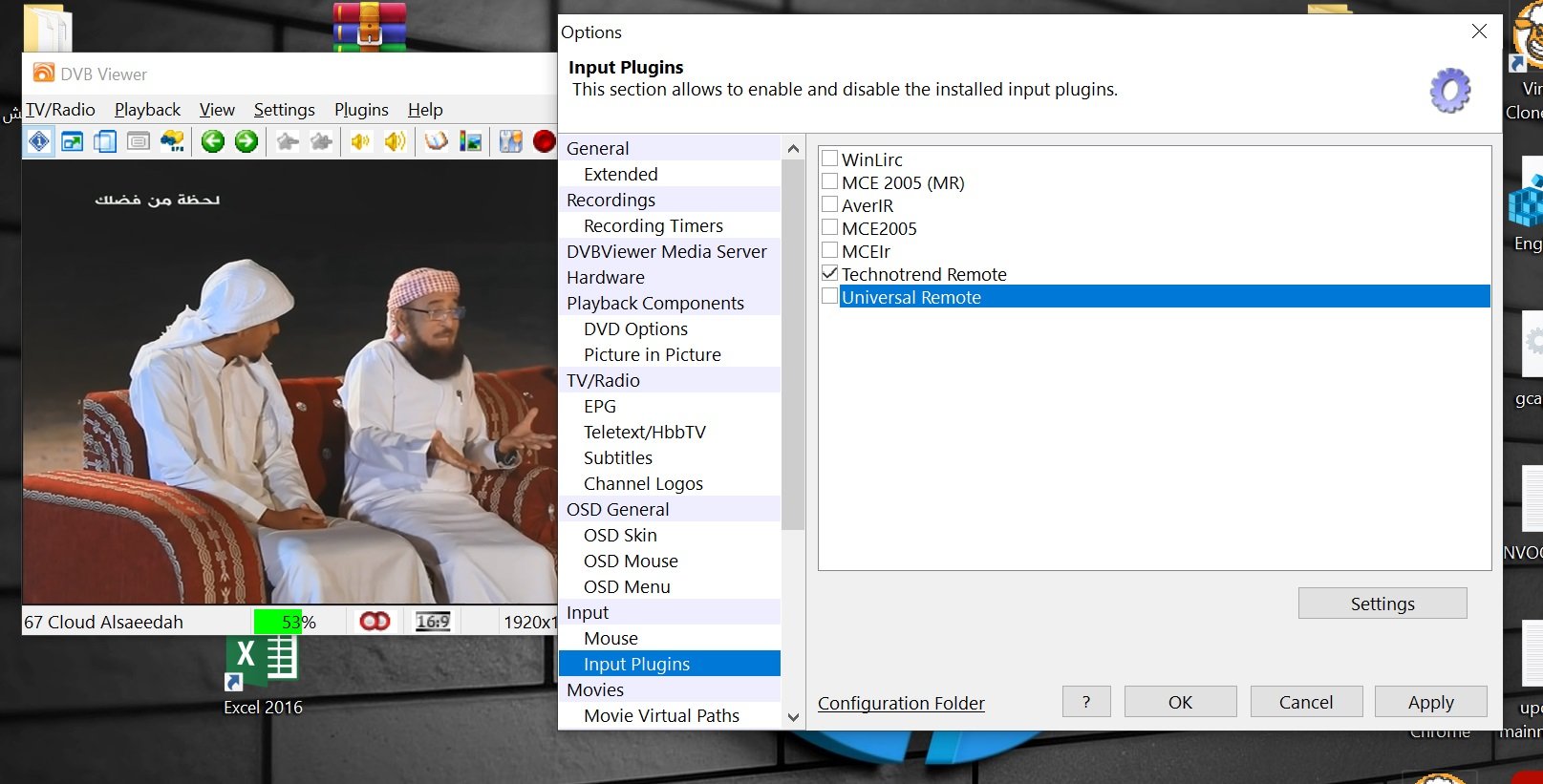
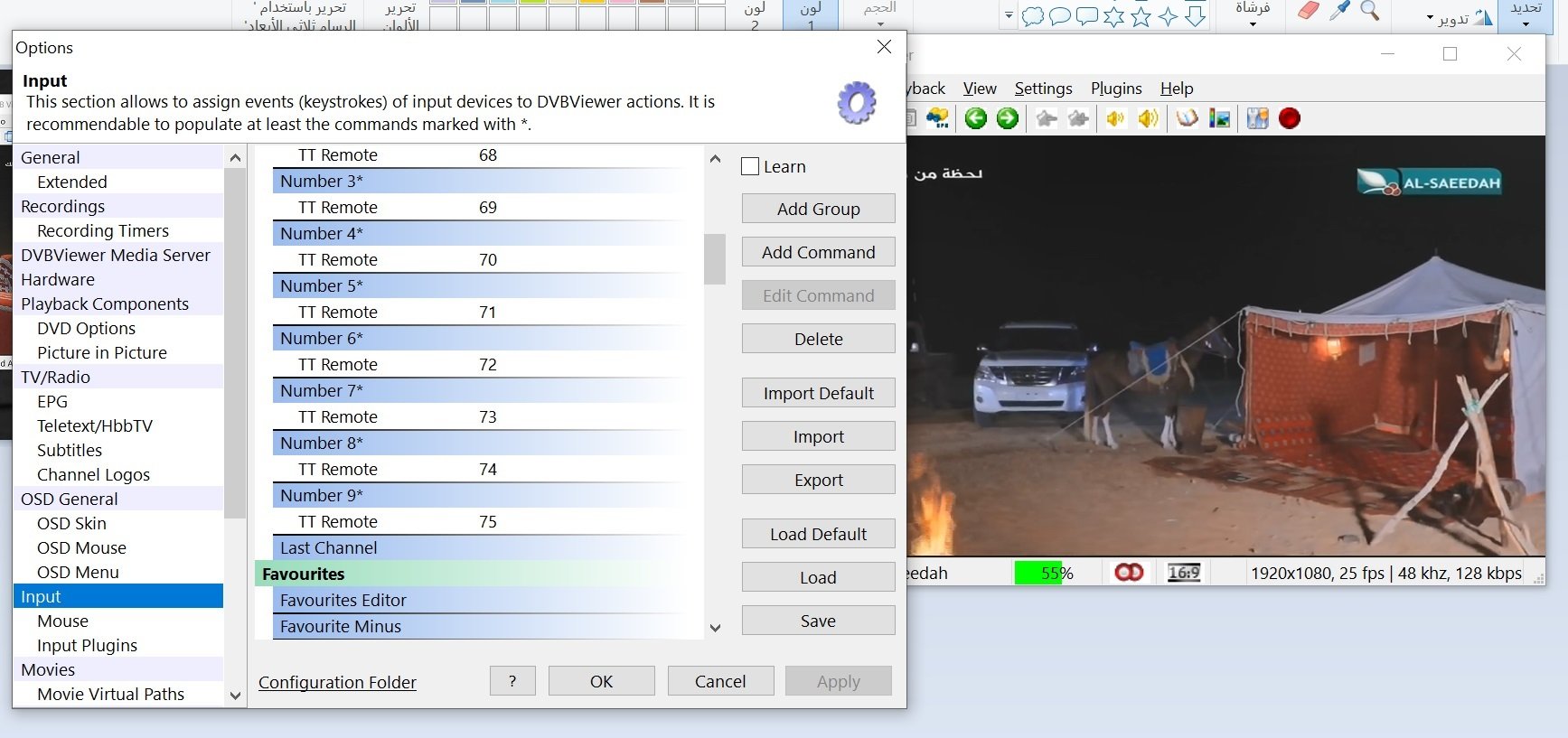
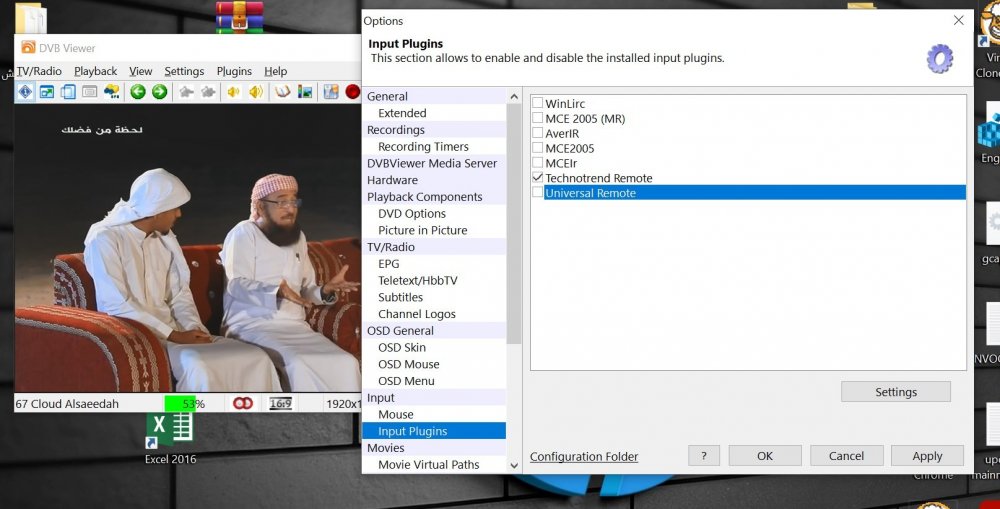
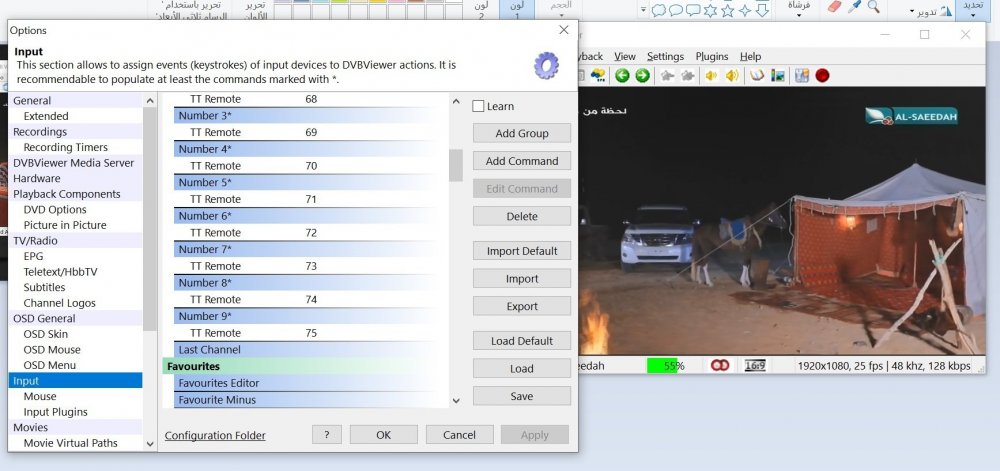
Yes it worked for me on the old PC with Windows 10 22H2 X64. If I remember correctly, in the 1st picture above I had to select it and then press button "Settings" to configure it. -
Does the remote for the DVBViewer program work on Windows 10? I tried several times and it didn't work, but it works for me on Windows 8.
-
You may want to delete old attachments - click your user name at the top right of the forum. There is a menu item for managing your attachments. There is! CheckAutoRetune means, no data arrived for 5 seconds, so the virtual TS Stream Device 10 (here also labeled "File Device") tried to re-establish the network connection, assuming that it got broken somehow. However, there is something supposed to follow in the log, as other retuning in your log shows, for example Since this is not performed by TS Stream Device 10 after the retuning was triggered, there is evidence that stopping or closing the device caused the crash, for whatever reason. It blocked the Media Server's main thread, so it didn't work any more. The Bad CRC entry originates from another thread (the streaming thread receiving DVB/network data), so there was still some reception going on in the background several hours later, maybe due to a recording that the main thread couldn't stop anymore in time. Unfortunately it is hard to spot why and where the blocking actually occured, maybe in the Media Server code, maybe in the underlying network library, or even in the Windows Winsock2 implementation or the networ adapter driver... maybe it only happens rarely due to certain timing conditions, so it can't be reproduced easily. I think what we can do now is I can investigate thoroughly if something can be found in the Media Server's TS Stream code that may cause such a blocking. May take some time... Since you now know what to look for, you can observe if this kind of crash happens again. You can consider if you really want/need this retuning mechanism. It can be configured for TS Stream Devices that have been manually added to the Media Server's device list - see Hardware -> Retune on missing stream... The default is 5 seconds, the value 0 disables auto-retuning for a device.
-
Utilisation carte Avermedia HD capture GC573.1
Griga replied to djK's topic in DVB Hardware (Digital TV cards)
Please follow the link that I have posted above. Veuillez suivre le lien que j'ai posté ci-dessus. Use a Google translation if you don't understand English. In this forum everything is written in English or German. Utilisez Google Traduction si vous ne comprenez pas l'anglais. Sur ce forum, tout est écrit en anglais ou en allemand. -

Utilisation carte Avermedia HD capture GC573.1
djK replied to djK's topic in DVB Hardware (Digital TV cards)
Bonjour, Je ne comprends pas ou vous voulez en venir avec un fichier support.zip ? pouvez-vous m'éclaircir a ce sujet svp Merci -
Strange. Here it's just the other way round. I would need more insight in your configuration, at least a zipped and attached svcdebug.log, for checking what's going on. Be sure that letting tvheadend use the fe parameter will cause problems sooner or later, particularly if other clients are also accessing the Media Server or if the order of tuners in your device list gets changed for some reason.
-
Thanks, the TCP mode is working now. But after disabling FE parameter, I'm getting another RTSP setup error, so I had to turn it on again.
-
I observed the service stopped recording. The last recording was completed on 18.02.2026 at about 14:17. *svcrec.log* matches the files in the recording directory. The log went silent after 14:11, only this single Bad CRC line. I don't know if the interface worked at that time. I noticed the crash today at 8:00, the interface wasn't responding (timeout, not connection refused). I restarted it and it went back to normal. I attach the full svcdebug.log, maybe there is something relevant here I cannot spot? I've got a limit of the files uploaded (35 kB), so I put it on Dropbox: https://www.dropbox.com/scl/fi/43p0f17p8p3m1ln3uipck/svcdebug.log?rlkey=eg6bkjyj69lv13b82b6zyi4d3&st=bdo9sz4c&dl=0
-
"Bad CRC" is quite normal, and it's unlikely that this causes a crash. "Bad CRC" simply means that the CRC32 checksum of broadcasted Service Information data (mostly EPG) didn't match, which means, the data is somehow corrupted and therefore discarded by the Media Server. SI data is an important part of DVB streams and always CRC32 protected, enabling receivers to detect if it is not ok. You can read more about it here. What are the symptoms of the crash?
-
Hallo, heute war plötzlich kein Satempfang mehr möglich ("Kein Signal"), obwohl es am Morgen noch ging. Der Schneefall war eher mäßig, es war wohl mehr nasser Schnee. Vor dem Eingang des Quad-LNB wo die von der Schüssel gebündelten Strahlen ins LNB Gehäuse fallen, befand sich eine ca. 3 mm starke Schicht aus nassen Schnee, der schon durchsichtig war. Da es nicht gefroren hatte, ließ sich der Schnee mit einem Lappen wegwischen. Und der Empfang war wieder einwandfrei. Dies funktioniert natürlich nur, wenn man an die Satellitenantenne herankommt und sie sich nicht unzügänglich auf dem Dach befindet. Viele Grüße Webturtle