
All Activity
- Past hour
-

Fehlfunktionen nach Energiesparmodus (Win 10 pro)
Griga replied to ABerger's topic in Fehlermeldungen DVBViewer Pro/GE
https://www.dvbviewer.tv/forum/topic/64627-dvbviewer-700/#findComment-532485 - Today
-

Fehlfunktionen nach Energiesparmodus (Win 10 pro)
ABerger replied to ABerger's topic in Fehlermeldungen DVBViewer Pro/GE
Ach so, verstehe... 😉 gute Einstellung, nur wie erfährt man so von neuen Versionen? Eine Benachrichtigung im DVBV dafür gibts ja nicht, oder doch? Würde ich sehr nützlich finden, bin sonst nämlich immer zu faul, um selber nachzuschauen... sorry! Ich soll also die vorhandene Betaversion aus dem Mitgliederbereich laden... Zählt der aktuelle 'Fix' nicht als neue Version, von wg. aufsteigender Nummern? Oder besser gleich den 'Pro Downloader' verwenden, wie war das noch? 'Sorry once more'... und danke im Voraus! 😉 -
Fehlfunktionen nach Energiesparmodus (Win 10 pro)
Griga replied to ABerger's topic in Fehlermeldungen DVBViewer Pro/GE
Kannst du auch sofort haben: https://www.dvbviewer.tv/forum/topic/81397-fehlfunktionen-nach-energiesparmodus-win-10-pro/#findComment-535698 Eine Timeline für Releases gibt es hier nicht. Das entscheidet sich nach Lust und Laune Und manchmal nach Notwendigkeit. -
Die Installer archivieren sich selbst im Unterordner setup des DVBViewer-Programmordners mit der Versionsnummer im Dateinamen. Schau dort mal nach. Du solltest dort jetzt zumindest eine DVBViewer_Pro_setup_7.3.1.0.exe finden.
-
Fehlfunktionen nach Energiesparmodus (Win 10 pro)
ABerger replied to ABerger's topic in Fehlermeldungen DVBViewer Pro/GE
PS: Wenn ich das richtig verstehe, kommt durch den EPG-Fix nur ein Tabstopp in der Senderliste hinzu, wo es dann per Pfeiltasten weitergeht? Ansonsten wandert der Tabulator durch die vorhanden Felder, je nach Ausgangfokus: Details, Aufnehmen, Vormerken, Suchen, Exportieren, Schließen, dann die Datumseingaben und Filter oben, Bildlaufleisten rechts + unten etc... Inzwischen habe ich auch mal die anderen Video-Renderer* getestet: Mit 'System Default' und 'Overlay' kommt jeweils nur Magenta-Hintergrund, kein Videobild... Wozu gibt es die zur Auswahl, wenn sie gar nicht funktionieren, oder liegt das an meinem System? (* korrekter mit Bindestrich, weil deutsche Wortbildung, im Optionsfenster steht's ohne 😉) -

Little problems with the DVBViewer scheduler
enricob replied to enricob's topic in General DVBViewer Pro/GE
Programmers make the rules 🙃 Thank you. Enrico -
Hallo zusammen, ich möchte hier meinen Vorschlag vorbringen. Da ich ein Update installieren wollte, habe ich die aktuellen Versionen gedownloaded. Dabei ist mir aufgefallen, dass DVBViewer_setup.exe gespeichert wurde. » Version: Version 7.3.1.0 Imho macht es Sinn, um die Versionen auseinanderhalten zu können, wenn der Dateiname bereits VOR dem download richtig benannt werden würde, z.B. DVBViewer_setup_V7.3.1.0.exe Und das bitte übergreifend für alle Downloads. Wenn man nur auf die <latest> werweisen möchte, kann man natürlich noch den Link auf die Version setzen. ich weiß, dass das etwas mehr Verwaltung braucht, aber so ist es auch nach Jahren übersichtlich im Download-Ordner. -- Viele Grüße Sysselix
- 1 reply
-
- 1
-

-
Fehlfunktionen nach Energiesparmodus (Win 10 pro)
ABerger replied to ABerger's topic in Fehlermeldungen DVBViewer Pro/GE
Genial, aber das muss man erstmal wissen. Die Kombi mit Strg + Pfeilen gibts ja sonst nur in Textfeldern, und auch dort nicht überall, in 'gescripteten' z. B. gehen sie oft nicht... Bin jedenfalls gespannt auf das Update, würde auch gerne dafür zahlen! Schon eine 'Timeline' in Aussicht, wann das rauskommt? -
Fehlfunktionen nach Energiesparmodus (Win 10 pro)
Griga replied to ABerger's topic in Fehlermeldungen DVBViewer Pro/GE
Genau. Und wenn gleichzeitig Strg gedrückt ist, wird nur gescrollt, ohne dass sich die Markierung ändert. Das ist bei anderen Listen im EPG-Fenster auch so. -
Fehlfunktionen nach Energiesparmodus (Win 10 pro)
ABerger replied to ABerger's topic in Fehlermeldungen DVBViewer Pro/GE
Oha, das sind schöne Entwicklungen, freut mich auf die nächste DVBV Version! 😉 Die Windows-Option 'beim Draufzeigen Scrollen' hatte ich gemeint, bisher aber nicht genutzt, alte Gewohnheit... Das alte 'Tweak UI' hatte bis etwa XP noch viele Goodies im Gepäck, die heute wohl überflüssig sind... Bei 'JR' (wie 'junior', wg. junge Leute) lasse ich das 'River' immer weg, weil der Name keinen Bezug zu irgendwas hat... Bin dort auch etwas als Übersetzer bzw. Korrektor der deutschen Sprachversion aktiv, hin und wieder auch im Forum. Dem LAV-Autor bin ich dort u. a. begegnet -- ein bunt gemischtes Entwicklerteam aus aller Welt. Zum EPG & Timeline: Wird die Programmliste dann komplett mit Tastatur bedienbar? Wenn also irgendeine Sendung markiert ist, dass die Pfeiltasten jeweils die nächste (links, rechts, oben, unten) markieren und in 'Details' anzeigen? Das wäre nett, aber wie reagiert der Tabulator? Bislang umfasst das EPG-Fenster 12 Tabstopps, davon 2 auf Bildlaufleisten, die dann auf Pfeiltasten reagieren. Kaum möglich, dass jede Sendung einen Tabstopp zählt... -
Fehlfunktionen nach Energiesparmodus (Win 10 pro)
Griga replied to ABerger's topic in Fehlermeldungen DVBViewer Pro/GE
Ja, JRiver Media Center. Noch nicht probiert, aber davon gehört. Der Autor der LAV Filters arbeitet an dem Projekt mit (siehe hier), und die Unterstützung für alle relevanten Media-Formate beruht darauf, dass JRiver die LAV Filters verwendet. Ich nehme an, dass die Module separat als Open Source entwickelt werden, weil es so eine Menge Lizenzgebühren spart, die Produzenten kommerzieller Software sonst an Patentinhaber zahlen müssten. Und es hat wohl auch damit zu tun, dass die LAV Filters wiederum FFmpeg-Code als Basis verwenden und deshalb an die dazugehörigen Lizenzbedingungen gebunden sind. So profitiert allerlei Media Software davon, und natürlich auch der DVBViewer. Habs gefunden: Erleichterte Bedienung -> Mauszeiger -> Zusätzliche Mauseinstellungen -> Inaktive Fenster beim Draufzeigen scrollen. Das funktioniert auch im EPG-Fenster des DVBViewers, d.h. mit der Einstellung scrollt das Mausrad die Timeline oder die Details, je nach dem, wo sich der Mauszeiger befindet, und dürfte damit dein Problem lösen. Die Beschäftigung mit der Timeline im EPG-Fenster hat noch Probleme aufgedeckt, die mir bislang entgangen waren. Z.B. lässt ein Verschieben des Splitters zwischen Timeline und Details nach unten keinen vertikalen Scrollbalken erscheinen, wenn dadurch die Details zu klein werden, um alles anzuzeigen. Ein Fix sorgt jetzt dafür, dass beim Loslassen der linken Maustaste der Scrollbalken sichtbar wird. Weiterhin ist mir aufgefallen, dass die Timeline nicht auf die Pfeiltasten, Bild oben/unten, Pos1 und Ende reagiert. Auch das wird im nächsten Release anders sein. - Yesterday
-
Fehlfunktionen nach Energiesparmodus (Win 10 pro)
ABerger replied to ABerger's topic in Fehlermeldungen DVBViewer Pro/GE
Das tut mir leid für euch... umso mehr, als die 'Streamer' nicht besser sind als ÖRs + Private FTA-Programme! Das Wort 'linear' kannte ich dafür nicht, wie heißt das 'analoge' Pendant? Nicht schlecht ist 'zeitversetztes' TV wie bei Waipu, wenn die Filme es denn lohnen würden... 😉 Das Gefühl kenne ich gut, arbeite seit 18 Jahren als freier Übersetzer im Heimbüro... Mit Beginn des KI-Booms ist es echt schwierig geworden, alle Agenturen rüsten technisch auf, um Honorare für 'menschliche Übersetzer' zu sparen. Die Maschine schafft mehr, schneller und billiger... 😉 Damit hast du völlig Recht, kontinuierliche Weiterentwicklung kostet Zeit, die bezahlt werden muss. Das kenne ich vom 'JR Media Center', zufällig bekannt? Verstanden 'as a service', bringen die jedes Jahr eine neue Hauptversion zum Upgrade-Preis heraus, für Käufer zwischendurch viele kostenlose Updates. Für mich das beste Multimedia-Programm auf dem Markt... Unterstützt auch TV-Karten, nur mit EPGs hapert's, weil die US-Entwickler ihren Markt bevorzugen. Typisch! 😉 Macht's weiter hübsch! Wenn irgendwas ist, melde ich wieder! Danke & Grüße, A. B. -
Little problems with the DVBViewer scheduler
Griga replied to enricob's topic in General DVBViewer Pro/GE
Now I remember why it is done this way. Because the channel change is triggered by a timer, and the user may be absent when it happens. A modal prompt for confirmation popping up would stay on the screen until the user comes along and replies. During the waiting time parts of DVBViewer would be blocked and not work anymore, particularly the execution of other timers, because the prompt has been called from the timer execution loop. It's a programming rule: Never ask for confirmation in a modal dialog if something has been initiated automatically (not by the user). -
Little problems with the DVBViewer scheduler
enricob replied to enricob's topic in General DVBViewer Pro/GE
What didn't I understand this time? I don't even understand what I wouldn't have understood 😵 I had already understood everything you explained to me in this new message. No, maybe this time I did understand 🙂 Because what I said ("the user could be allowed to choose") is anyway true. What you say is also true, of course, what you say explains better (thank you) but it does not disprove what I said, simply because it is still true that ‘the user could be allowed to choose whether to keep the “Keep Timeshift File” setting permanent, in order to avoid having to reactivate it every time DVBViewer is restarted’. Yes, you also said that in case I set this “Keep Timeshift File” as permanent, I should remember that all this recordings could occupy all the tuners. But, as things stand now (without being allowed to set it as permanent), I have anyway to remember that the scheduled channel change interrupts timeshift playback without warning. Or I have to remember to set the “Keep Timeshift File”. I always have to remember something. What's more, also in case I have to set the “Keep Timeshift File” every time, also in this case I have to remember that all the tuners could be occupied at the moment I set the “Keep Timeshift File”. In case the “Keep Timeshift File” were set as permanent, it would only be different because I would have to remember it all the time instead of just when I manually set the command. And remembering all the time is not forcely more difficult. In fact, it is usually easier to remember and control an usual behaviour than a variable one. If the behaviour is always the same, you can also evaluate everything else in advance and, for example, establish automated routines (for example, to automatically empty a folder). If, on the other hand, I suddenly decide to set the “Keep Timeshift File”, then it may not work because the tuners are all busy because there are some other normal recordings scheduled some time ago and I did not remember, because is was not usual. Mostly, the difference is that in case I could set this “Keep Timeshift File” as permanent, I could choose what to remember. Also, I could choose to set it on or off, and so I could also choose to just forget it forever in case I'm not interested in setting this “Keep Timeshift File” as permanent. While in the other case I'm forced to remember to do it every time, or instead forced to remember that the scheduled channel change interrupts timeshift playback without warning. I mean, I was just talking about let the users able to choose whether to set something as permanent or not, and I believe that a choice is always better than no choice. Just it. Then someone may say that a function seems useless to them. But, apart from the fact that this is an individual opinion and that everyone may have opinions and mostly needs that differ from their own, it is still better to offer the choice because the choice anyway does not force anyone to use the choice option, whereas the lack of choice imposes a single mode. Just it. Then it is also possible that I did not really understand this time either, as usual, but for the moment it does not seem so to me in this case 🙂 Thank you. Enrico -
Radioempfang Klassik Radio gestört
Griga replied to StefanGPunkt's topic in Allgemeines DVBViewer Pro/GE
Vor/während des Downloads oder nach dem Download, wenn du die Datei mit der Maus in den Senderlisten-Editor des DVBViewers ziehen willst? Welche bekloppte Sicherheitssoftware ist da am Werk? Windows bzw. der Windows-Defender machen sowas normalerweise nicht. -

Radioempfang Klassik Radio gestört
StefanGPunkt replied to StefanGPunkt's topic in Allgemeines DVBViewer Pro/GE
Moin und erstmal guten Start in das neue Jahr und Danke, sorry für die späte Meldung, ich dachte ich bekomme eine Mail o.ä. wenn eine Meldung eingehen würde... Zur Sache: 1) Danke, 2) Habe die Klassik Daten im senderlisten-Editor mal geprüft, es sind exakt die Daten, die man auch für KlassikRadio findet. 3) Schnee in der Schüssel? Jo, guter Hinweis. Da benötige ich Rat: Wir haben wirklich seit Tagen immer mal wieder etwas Schnee in der Schüssel, nur ich habe gar keine Empfangsprobleme, weder am Haus und den TV-Geräten noch in am PV mit der TV-Empfangskarte (wo DVBViewer tadellos läuft). Will sagen: Alle Sender sonst, stichprobenartig überprüft ARD-Hörfunksender über Bayern, Hessen, NDR usw. laufen alle. TV-Sender ebenso... also die ÖRR-Sender... KlassikRadio lief bei mir noch an den Weihnachtstagen... dann klappte es nicht mehr ? 4) Musikordner hinzufügen? Doll, habe ich noch nicht gemacht, wie geht das? Im Senderlisten-Editor? ich scheitere aber schon daran, dass ich die Daten hier nicht übernehmen kann, es wird angezeigt "blockiert, da der Dateityp Ihr System beschädigen kann", Können wir das irgendwie umgehen/lösen? Gruß Stefan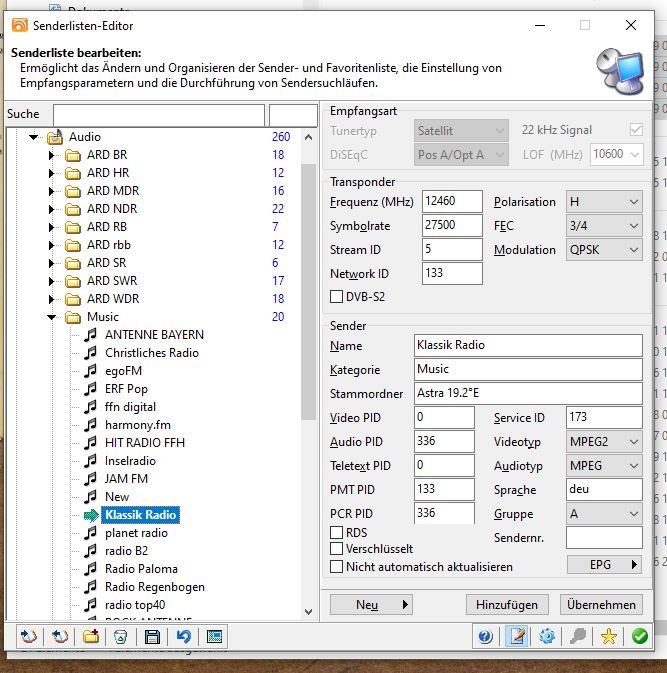
-
Fehlfunktionen nach Energiesparmodus (Win 10 pro)
Griga replied to ABerger's topic in Fehlermeldungen DVBViewer Pro/GE
Ich sach dir! Anwender-Feedback ist eine wichtige Quelle für die Weiterentwicklung und Verbesserung des DVBViewers. Aus den Diskussionen resultieren immer wieder wichtige Anregungen oder zumindest Überprüfungen von Funktionen. Es ist für einen Entwickler praktisch unmöglich, alle möglichen Szenarien und Abläufe mit allen möglichen Einstellungen selbst durchzutesten. Ja , auf jeden Fall. Lineares TV ist im Abwind. Die DVBViewer-Verkäufe sind wesentlich geringer als noch vor 10 Jahren oder so. Auch aufgrund eines schrägen Geschäftsmodells, bei dem alle, die einmal gekauft haben, praktisch unbegrenzt Updates erhalten. Hätte hier jemand mit ausgeprägtem Geschäftssinn das Sagen, gäbe es schon längst ein Abo-Modell. Der DVBViewer wird im Grunde durch Idealismus und Spaß an der Sache am Leben erhalten, ähnlich wie bei freier Software. Viel zu verdienen gibt es hier nicht. -
Little problems with the DVBViewer scheduler
Griga replied to enricob's topic in General DVBViewer Pro/GE
You still don't understand. Activating "Keep Timeshift File" changes a timeshift recording to a normal permanent recording, as if it has been started manually with the red recording button. This means, it will run 23:59 hours, if not stopped manually, and if you try to switch over to another channel, but no free tuner is available for it, DVBViewer will not ask, but simply tell you that there is no available device for this action and not allow channel switching, because permanent recordings have a higher priority than playback of a channel. You would first have to stop this recording in order to be able to switch to another channel that requires a free tuner. Particularly if Options -> TV/Radio -> Start timeshift automatically ist ticked, "Keep timeshift file" as default setting would let each channel change start a permanent recording. Of course, if you have let's say 4 tuners, some channel switching would be possible, until all tuners are occupied by permanent recordings, but in the end DVBViewer would perform 4 recordings at the same tiime, or even more, because some channels may be located on the same frequency, so they can be received simultaneously with a single tuner. You can use "Keep timeshift file" intentionally, if you want to switch over to another channel without losing timeshifted playback of the channel that you are leaving (provided a tuner is available for the switching). By this you can even achieve multi-timeshift of two or more channels at the same time. But then you have to keep in mind that now permanent recording are running, that sooner or later have to be stopped or deleted manually by you. - Last week
-
Little problems with the DVBViewer scheduler
enricob replied to enricob's topic in General DVBViewer Pro/GE
Many thanks. This is useful because it allows you to resume the timeshift playback, but it doesn't work as well as when the "Keep Timeshift File" setting is checked and the previous channel remains available at the position to which the user jumped back before the channel change. When the "Keep Timeshift File" setting is checked you simply need to change channel back again. When the timeshift file has not been deleted, you need to open the timeshift file which has not been deleted and then search for the point where playback was interrupted. Thank you. Enrico -

Little problems with the DVBViewer scheduler
HaraldL replied to enricob's topic in General DVBViewer Pro/GE
Close DVBViewer. Start menu -> DVBViewer -> DVBViewer Pro Tweaker -> at about 1/3 of the list is an option "Delete timeshift files automatically". Is enabled by default. Untick it, then "Save". Now you can restart DVBViewer. After that Timeshift-Files are kept and fill your hard disk like with the option before😉 This feature was used so little it was moved from the main program to the tweaker. -
Fehlfunktionen nach Energiesparmodus (Win 10 pro)
ABerger replied to ABerger's topic in Fehlermeldungen DVBViewer Pro/GE
Heiderdaus, immer interessant zu erfahren, was unter der glänzenden Oberfläche eines PC so vorgeht... Das sind eine Menge von Bedingungen, bevor die ahnungslosen Anwender irgendwas sehen können... 😉 Von 'MadVR' habe ich gehört, klingt nach was für Perfektionisten ('mad about video render'?), brauch ich also nicht... Um ehrlich zu sein, der DVBV läuft meist nur nebenher, während ich irgendwas am großen TV-Bildschirm sehe. Dort immer seltener TV-Programm, mal abgesehen von Feiertagen läuft wenig Interessantes... Ich finde aber toll, dass ihr euch so viel Zeit nehmt, um auf ein Thema einzugehen... Kann es sein, dass im Forum nicht viel los ist? Ich war die letzten Tage oft der einzige Benutzer... Vermutlich haben TV-Karten zurzeit kräftige Konkurrenz von Streaming-Diensten. Macht sich das für euch bemerkbar? PS: Timerfunktion immer noch nicht getestet (s.o, nichts zum Aufnehmen da... 😉 Gehe aber davon aus, dass alle Bedingungen nun erfüllt sind, damit die auch wieder geht. Grüße, A. B. -
Little problems with the DVBViewer scheduler
enricob replied to enricob's topic in General DVBViewer Pro/GE
Yes, we can. It wasn't my intention to make an endless loop. It's just I didn't understand what you explained to me the other day. I'm sorry 😳 I finally understand: it's not an issue and you can't change it by settings. You could only change the software. The only thing, regarding what you said The only thing is that this warning on a scheduled channel change could be added as an option rather than a fixed configuration, in order to not annoy users who would not like it. Similarly, the user could be allowed to choose whether to keep "Keep Timeshift File" setting permanent, in order to avoid having to reactivate it every time DVBViewer is restarted. Thank you. Enrico -
Little problems with the DVBViewer scheduler
Griga replied to enricob's topic in General DVBViewer Pro/GE
Yes. This is also correct. It's no bug, but intended, as I've already stated: You are right. DVBViewer performs a forced channel change, assuming that this is what you want after having prebooked a certain programme. It assumes that this has a higher priority, because you have planned it purposely. This would be possible. However, it's unknown what other users think about it. Applications that query on each and every opportunity if something initiated by the user should really be done can be quite annoying... anyway, I'll think about it. Can we now stop this endless loop? -
Little problems with the DVBViewer scheduler
enricob replied to enricob's topic in General DVBViewer Pro/GE
So, in case this "Keep Timeshift File" setting (the one shown in the image below 👇) is checked, DVBViewer changes channels without a warning because in this case the recording for timeshift is not deleted and you can change the channel back again and continue watching it timeshifted. Or, in case this "Keep Timeshift File" setting (the one shown in the image below 👇) is unchecked, DVBViewer should show a warning and ask for confirmation before changing the channel? Is it correct? I've done another test. When the channel change because of a scheduled channel change, in case of timeshifted playback (the user has already jumped back in time and is actually using the timeshift recording) and when this "Keep Timeshift File" setting is checked, then the channel changes and the previous channel remains available at the position to which the user jumped back before the channel change. So everything is correct. It works. However, this is not very useful because "Keep Timeshift File is no general permanent setting anymore" (I read the change log 😇) and therefore it should be activated every time DVBViewer is opened. Mostly, when the channel change because of a scheduled channel change, in case of timeshifted playback (the user has already jumped back in time and is actually using the timeshift recording) and when this "Keep Timeshift File" setting is UNchecked, the channel changes WITHOUT warning and without confirmation, and obviously the previous channel is no longer available at the position where the user jumped back before the channel change. So it is not correct. It does not work properly. On the contrary, the warning and confirmation message is properly there in case the channel change has been not scheduled but done by the user in real time. So, as you said, "DVBViewer also changes channels without a warning if it is using a persistent recording for timeshift", but in this case DVBViewer changes channels without a warning even if it is NOT using a persistent recording for timeshift. So, it seems that there is an issue just in case of a scheduled (just scheduled) channel change with timeshifted playback (and when the "Keep Timeshift File" setting is unchecked). Is it really an issue? Or is it just a matter of some settings I did not properly managed? To try to resolve the issue, is it essential to send the support tool file (which I am unfortunately unable to send at the moment due to problems with my system with the BFE service and registry key, etc)? Or is it just a matter of some settings I should manage properly? Please let me know if you have any suggestions. Thank you very much. Enrico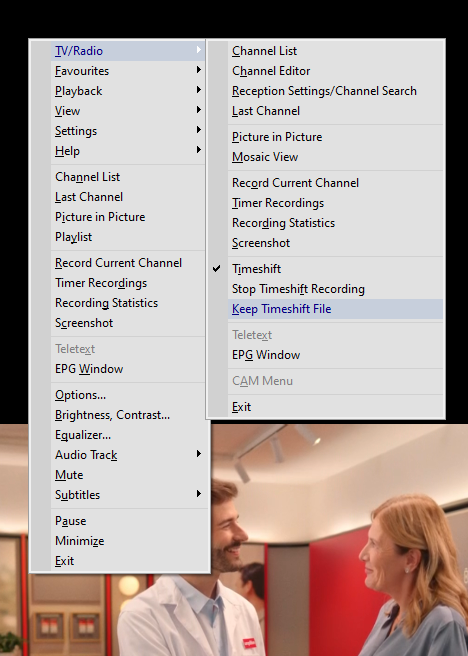
-
PC wird nach Beenden der Aufnahme nicht mehr in den Ruhezustand versetzt
Griga replied to Günter Mattfeldt's topic in Einsteigerfragen DVBViewer Pro/GE
Thema geschlossen, damit es hier nicht zu weiteren Anfeindungen kommt.
