All Activity
- Past hour
-

PC Wakes But Recording Doesn't Happen
Shaun White replied to Shaun White's topic in DVBViewer Media Server
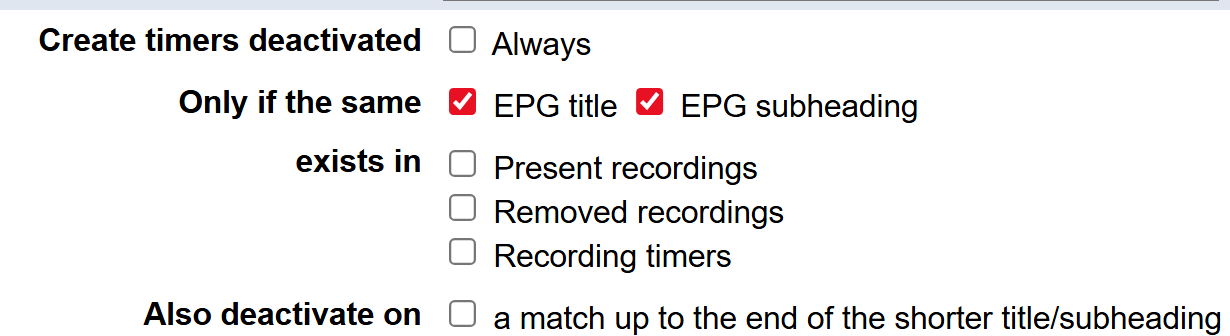
It certainly is a mystery. I cracked the PC open, prised the CMOS battery out and tested it and it isn't that. I left it on Saturday and set some timers which should force the PC to wake and sleep. There were gaps in the timers so no overlap or reason for it to stay awake for the next timer. It successfully did four BBC News programs, sleeping and waking in between according to the event viewer. I set it to record a film last night and nope. It's not playing. It should have woken at 20:50 and it didn't. I manually turned on the machine and once again had to stop and restart the server and then the recording began. I checked my timers and they're all green. On the Search EPG screen, I only have ticks in these boxes and the presets are the same: The film I tried to record last night was a one-off so I have no preset and I picked it from the EPG. I'm doing a Windows reinstall to see if that gives it the kick it needs.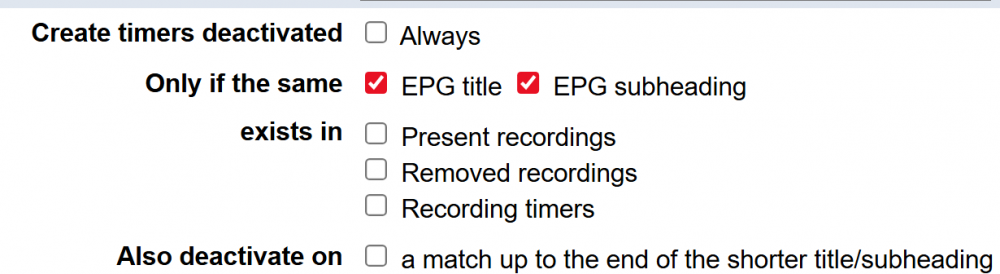
- Today
-

Änderungen DVBViewer Pro Beta 7.3.1.11: TS Stream
Griga replied to Bob.Dig's topic in Fehlermeldungen DVBViewer Pro/GE
Eine unsinnige Definition, höchstens geeignet für vorsätzliche Supportbehinderung. Was, wenn jemand mehr als einen PC hat? Natürlich gibt es ein Problem. Du bemerkst es nur nicht, weil der Fallback "Als Datei wiedergeben" automatisch greift. Im Log wird es offensichtlich. Der DVBViewer erkennt zwar, welcher Art der Stream ist (nämlich einfach ein in HTTP verpackter TS) , notiert dies jedoch nicht richtig, kann ihn deshalb nicht mittels TS Stream Framework behandeln und delegiert die Angelegenheit an den LAV Splitter. Der Media Server hat wegen der selben Codebasis das gleiche Problem, aber nicht die Möglichkeit des Fallbacks, weil er keine DirectShow-Wiedergabekomponenten verwendet. Deshalb scheitert der Empfang des Streams einfach. Das Grundproblem ist hier, dass DVBViewer/DMS der URL den Streamtyp nicht sofort ansehen können (z.B. durch eine Dateiendung wie .ts). Sie müssen erst den HTTP-Header vom Server lesen. Wenn du ihnen auf die Sprünge hilfst, indem du z.B. in der URL http:// durch ts:// ersetzt, geht es auch ohne Fallback. Ein bedauerlicher Bug, der mich zwingt, DVBViewer und DMS noch mal neu hochzuladen -

Netzlaufwerke / Freigaben Mediasammlung
HaraldL replied to horvy's topic in Einsteigerfragen DVBViewer Pro/GE
Am einfachsten wäre es wenn du auf dem NAS einen User mit gleichem Namen und Kennwort wie dein Windows-User erstellst. Und den DMS-Dienst von System auf eben diesen User umstellst. Dazu muß er ein Kennwort haben, ohne geht nicht. Dann kann der DMS per UNC-Pfad (\\NAS-Name\Freigabe\Ordner ...) zugreifen, nicht per Laufwerksbuchstabe. Oder du fügst Windows den User mit Kennwort des NAS als Benutzer hinzu und verwendest diesen für den DMS-Dienst. Mit unterschiedlichen Usern auf PC und NAS machst du es dir hier unnötig schwierig bis unmöglich. P.S.: Deine support.zip ist kaputt, besteht ausschließlich aus Null-Bytes. -

Netzlaufwerke / Freigaben Mediasammlung
horvy replied to horvy's topic in Einsteigerfragen DVBViewer Pro/GE
Kommando zurück. Irgendwie funktioniert es jetzt wieder nicht mehr.. anbei die Support Zip.. Danke. support.zip -
Tolles Addon, gerade eingerichtet. Allerdings vermisse ich eine Funktion (vielleicht habe ich sie übersehen): Kann man irgendwo einrichten, dass ich Filme / Sendungen nicht mehrfach aufnehmen will. z.B. suche ich nach einem Schauspieler. EPGPlus findet einige Infos u.a. einen Film welcher zu Zeit X und einmal als Wiederholung nachts nochmal läuft. EPGPlus erstellt mir zwei Aufnahmen, somit hätte ich eine doppelte Aufnahme. Kann man das irgendwie übergehen bzw. vorher prüfen lassen, ob es nicht schon so eine Aufnahme gibt? Danke und Gruß
-
Netzlaufwerke / Freigaben Mediasammlung
horvy replied to horvy's topic in Einsteigerfragen DVBViewer Pro/GE
So nach bisschen testen, habe ich es geschafft einen passenden User auf meiner NAS zu erstellen. Jetzt werden die Medien geladen. Danke Dir! -

Änderungen DVBViewer Pro Beta 7.3.1.11: TS Stream
Bob.Dig replied to Bob.Dig's topic in Fehlermeldungen DVBViewer Pro/GE
Für mich ist das der auf meinem PC. 😉 Damit gibt es keine Probleme und sollte wohl der Normalfall sein. Ich sehe auch im Sendelisten-Editor, dass er von sich aus den Haken setzt, wenn ich den Stream wiedergebe. Log anbei. Also scheint diese Automatik vermutlich nicht zu greifen, wenn ich den Stream vom Viewer über den DMS beziehe. Mit der Version davor gab es aber das Problem für mich generell noch nicht. DVBViewer.log -
Änderungen DVBViewer Pro Beta 7.3.1.11: TS Stream
Griga replied to Bob.Dig's topic in Fehlermeldungen DVBViewer Pro/GE
Was ist für dich ein lokaler Viewer? Für mich ist es einer auf dem Server PC. Ansonsten ist es ein Remote Client bzw. Viewer. Im "geht nicht" Log wird der Stream offenbar vom DMS via RTSP bezogen, und der antwortet mit "404 not found". Wie sieht es aus, wenn ein 7.3.1.11 DVBViewer den Stream direkt bezieht (nicht vom DMS und nicht mit "Als Datei wiedergeben")? Leider deckt keines der Logs diesen für mich aussagekräftigen Fall ab. Im "geht nicht" spielt sich das entscheidende im DMS ab, im "geht" im LAV Source Filter, wo das Logging nicht hinreicht, weil der DVBViewer damit selbst kaum was zu tun hat. -
Änderungen DVBViewer Pro Beta 7.3.1.11: TS Stream
Bob.Dig replied to Bob.Dig's topic in Fehlermeldungen DVBViewer Pro/GE
Alle sind auf der aktuellsten Beta-Version. Der Lokale Viewer bezieht seine Streams (hoffentlich) vom DMS auf dem Server. Der Viewer neben dem DMS auf dem Server ist Stand-Alone und wird nur für den Playlist-Import und zur Erstellung der Favoriten genutzt, damit diese dann vom DMS verteilt werden können (an einen Client). -
Änderungen DVBViewer Pro Beta 7.3.1.11: TS Stream
Griga replied to Bob.Dig's topic in Fehlermeldungen DVBViewer Pro/GE
7.3.1.11? Ohne lokale DMS-Anbindung? Dann brauche ich ein DVBViewer.log nach Reproduktion im Debug-Modus. Da dort auch die URLs drinstehen, eventuell via PM. Auch 7.3.1.11? Bezieht den Stream vom DMS? Welche DMS-Version? -
Änderungen DVBViewer Pro Beta 7.3.1.11: TS Stream
Bob.Dig posted a topic in Fehlermeldungen DVBViewer Pro/GE
Erst mal Danke für die neue Version. Bin schon gespannt, das neue Timer-Feature durch copy&paste auszuprobieren. 😀 Aktuell habe ich aber das Problem, dass der lokale Viewer (mein PC) keine "meiner" Streams mehr abspielt, es sei denn, ich setze im Senderlisten-Editor einen Haken bei "als Datei wiedergeben". Der Viewer, der neben dem DMS installiert ist (Server-PC), hat das Problem nicht. Auch versuche ich (und ich hoffe, das ist durch das Update nicht irgendwie durcheinander gekommen), dass der lokale Viewer seine Streams immer durch den DMS bezieht und keine eigenen Verbindungen aufbaut. Dieser Umstand erklärt vermutlich das unterschiedliche Verhalten der beiden Viewer? Mit dem Viewer neben dem DMS importiere ich unregelmäßig die Playlist für alle Streams, außerdem erstelle ich damit die Favoriten für den DMS etc.. "C:\Program Files (x86)\DVBViewer\DVBViewer.exe" -l "http://10.249.248.10:6878/playlist/get?format=m3u&generate_player_id=1" -r ace Es wäre vermutlich zu viel Aufwand, bei jedem Sender nun den Haken zu setzen, zumal das nach jedem Import vielleicht wiederholt werden müsste. Hab das aber noch nicht ausprobiert. Favoriten werden am Namen wiedererkannt.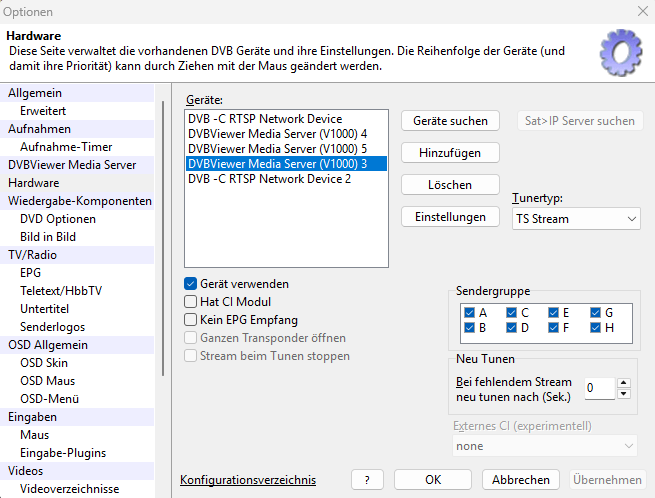
-
Gebraucht wird nicht nur ein Compiler, sondern auch eine kompatible Komponenten-Bibliothek für die ganzen Kontrollelemente wie Buttons, Checkboxen, Listenansichten usw. Wenn, wäre wohl Lazarus als Entwicklungsumgebung die erste Wahl. Nichtsdestotrotz wäre auch damit eine Riesen-Anpassung des gesamten DVBViewer- und Media Server-Quellcodes fällig.
-
DVBViewer Pro Beta 7.3.1.11 Die Beta-Version 7.3.1.9 des DVBViewers wurde im Mitglieder-(Download-)Bereich -> Beta Section durch die Beta Version 7.3.1.11 ersetzt. Da diese Version wieder unsigniert ist, treffem die für Version 7.3.1.9 gegebenen Hinweise immer noch zu (siehe vorherigen Post oben). Deshalb ist es zu empfehlen, den signierten DVBViewer Pro Downloader einer bisherigen DVBViewer-Version (siehe Windows Startmenü -> DVBViewer) ein Update durchführen zu lassen, um irreführende Windows-Warnungen zu vermeiden. Durch Scrollen ganz nach unten im DVBViewer Pro Downloader wird eine neue Sektion "Applications" sichtbar. Hier kann man Betaversionen auswählen und dann den Downloader arbeiten lassen. Solange der originale Downloader verwendet wird (mit Christian Hackbart als verifiziertem Herausgeber im Dialog der Benutzerkontensteuerung) oder der Download aus unserem Mitgliederbereich erfolgt, ist sichergestellt, dass wir der Herausgeber sind, trotz Warnungen. Bitte auch beachten: Der Download und Start der DVBViewer Media Server Beta 3.3.1.11 Vollversion erfordert den Erwerb einer zusätzlichen Lizenz (falls noch nicht geschehen). Dies betrifft jedoch nicht die eingeschränkte Basic-Version (siehe hier). Änderungen DVBViewer Pro Beta 7.3.1.11 Geändert:TS Stream: Streamformate, die der DVBViewer nicht selbst im TS Stream-Rahmen behandeln kann, insbesondere Vorbis, FLAC oder Opus Radiostreams, werden nun automatisch an den LAV Quellfilter delegiert (oder eine andere DirectShow-Komponente, die damit umgehen kann). Zuvor musste dies manuell durch Anhaken von „Als Datei wiedergeben“ im Senderlisten-Editor veranlasst werden, was nun auch automatisch passiert. Das funktioniert auch, wenn der Empfang des Streams an einen lokalen Media Server 3.3.1.10 oder eine spätere Version delegiert wird (siehe Tweak „TS Stream über den lokalen Media Server empfangen“, Standard = ein). Allgemein wurde der Empfang solcher Streams auf verschiedene Weise verbessert.. Ergänzt: TS Stream: Verarbeitung und Wiedergabe von AC3 und EAC3 (Dolby Plus) (Radio-)Streams im TS Stream-Rahmen. Fix: Video-Wiedergabe: Unter bestimmten Bedingungen blieb der Bildschirm mit dem MPC Video Renderer nach dem Wiedergabestart bis zu einer Größenänderung des Videos oder „Wiedergabe neu aufbauen“ schwarz (siehe hier). Geändert: Video-Wiedergabe: Der DVBViewer wendet den Tweak „XYSubFilter für Untertitel laden“ (→ Tweaker.exe starten) jetzt auch auf den MPC Video Renderer an (zuvor nur auf den MadVR Video Renderer, siehe hier). Ergänzt: Audio-Wiedergabe: Möglichkeit, zwei oder mehr DVBViewer-Instanzen gleichzeitig Audio wiedergeben zu lassen, indem man die Umschalttaste gedrückt hält, während man eine Aktion durchführt, die normalerweise alle anderen Instanzen stummschalten würde, insbesondere beim Starten einer weiteren DVBViewer-Instanz oder Einschalten von Audio bei einer bereits laufenden stumm geschalteten Instanz, z.B. durch Aufdrehen der Lautstärke (siehe hier). Ergänzt: RSS Feeds: Unterstützung für die Wiedergabe von Medieninhalten im HLS und MPEG Dash Format, die RSS Feeds als Link enthalten. Dies betrifft die OSD Nachrichten-Seite und die DVBViewer-Wiedergabeliste (siehe 7.3.1 Änderungen und hier). Fix/Ergänzt: OSD: Im OSD Favoriten Editor wurden mehrere Unzulänglichkeiten behoben und Möglichkeiten ergänzt: Fix: Das Löschen von Favoriten funktionierte überhaupt nicht. Fix: In vielen Fällen erschienen hinzugefügte Kategorien (Gruppen) oder Favoriten außerhalb des sichtbaren Bereichs bzw. wurden nicht in ihn hinein gescrollt. Fix: Bei Änderungen außerhalb des Editors wurde die angezeigte Sender- und Favoritenliste nicht aktualisiert. Fix: Fehlende Funktionen im OSD Default Skin (Buttons für das Umschalten zwischen TV und Radio, Button für das Umbenennen von Favoriten-Kategorien). Ergänzt: Möglichkeit, den Selektiert-Zustand aller Sender innerhalb einer Senderlisten-Kategorie durch Selektieren des Kategorienamens umzuschalten (z.B. um alle Sender innerhalb einer Kategorie zu selektieren und den Favoriten hinzuzufügen). Ergänzt: Möglichkeit, zwischen der Anzeige der Senderliste mit oder ohne Audiospur-Untereinträgen umzuschalten, indem der bereits selektierte TV Button erneut angewählt wird (falls eine bestimmte Audiospur eines Senders den Favoriten hinzugefügt werden soll). Fix: OSD: Up/Down-Buttons wurden beim Überstreichen mit der Maus nicht aktiviert, und waren als Folge im OSD Sleeptimer Plugin nicht anklickbar (siehe hier). Weiterhin reagierten die Buttons träge auf Mausbewegungen (siehe hier). Fix: OSD: Wenn der Tweak „Mini-EPG im Timeshift-Modus anzeigen“ (→ Tweaker.exe starten) ausgeschaltet war, zeigten verschiedene Seiten des OSD Standard-Skins Senderlogos auf versetzte Weise doppelt an (nicht nur im OSD Hauptmenü, was in Version 7.3.1.9 behoben worden war). Außerdem zeigte das OSD Medienfenster statt des Media-Titels „Timeshift“ als Titel an. Geändert: OSD: Verbesserungen auf der OSD UPnP-Seite. Sie zeigt nun die zuletzt gewählten Kategorie / Ordner-Inhalte, wenn sie erneut geöffnet wird (zuvor zeigte sie immer die verfügbaren Server). Außerdem erfasst sie mehr Metadaten wie Titel, Dauer, Interpret, Albumcover etc., so dass diese bei Wiedergabe eines Eintrags im DVBViewer-UI erscheinen können. Geändert: OSD: Bei Verwendung der Funktion Hinzufügen (OSD Rot) auf der OSD Musik-Seite, um einen Musikordner-Inhalt in die Wiedergabeliste zu kopieren, wird dieser nicht mehr an die aktuelle Wiedergabeliste angehängt, sondern ersetzt sie. Dies vereinheitlicht die Handhabung mit den OSD Video- und UPnP-Seiten. Einzelne Musiktitel werden jedoch nach wie vor durch die Funktion„Hinzufügen“ an die Wiedergabeliste angehängt. Fix: OSD: Die Anzahl Einträge, die von den Video- / Musik- / UPnP-Seiten auf einmal in die Wiedergabeliste übertragen werden können, ist nun auf 1000 begrenzt. Dies verhindert ein langes Einfrieren des DVBViewers beim (irrtümlichen) Hinzufügen des Wurzelverzeichnisses einer großen Musiksammlung oder eines UPnP Servers mit tausenden von Einträgen. Geändert: OSD: Die OSD Nachrichten-Seite zeigt nun den zuletzt gewählten RSS Nachrichten-Kanal, wenn sie erneut geöffnet wird, nicht mehr wie bisher den ersten in der Liste. Fix/Geändert: HbbTV: Einige Fixes und kleinere Verbesserungen hinsichtlich HbbTV (erfordert Add-On). Insbesondere funktioniert HbbTV der Schweizer Sender SRF/RTS/RSI zumindest teilweise wieder. Für die deutschsprachigen SRF-Sender war ein weiterer Eintrag in der Datei hbbtv2.xml ausreichend, der das Problem auch in vorherigen DVBViewer-Versionen behebt. Die die französisch/italienisch-sprachigen Sender RTS/RSI erforderten jedoch eine Änderung im DVBViewer-Code. Fix: Recorder: Timer mit wöchentlicher Wiederholung und Ausführung nur an einem einzigen Wochentag wurden nach der Aufnahme bis Mitternacht nicht auf das nächste Aufnahmedatum aktualisiert, was während der Zeit nutzlose sekündliche Aktualisierungen der Timer- und Aufnahmeliste auslöste (seit 7.3.1.9, siehe hier). Fix: Recorder: Aufnahmen mit wöchentlicher Wiederholung, die vorzeitig gestoppt wurden (vor Erreichen der Endzeit), startete der DVBViewer sofort erneut, weil er sie nach Weiterschaltung auf das nächste Aufnahmedatum fehlerhaft wieder zurückdatierte. Ergänzt: RTSP (Sat>IP) Client: Maßnahmen für Wiedergewinnung der Synchronisation mit einem Sat>IP Server im Transportmodus „TCP interleaved“, falls sie durch Datenverluste verloren geht. Fix: Hardware-Optionen: Nach Änderungen im Dialog „Sat>IP RTSP Einstellungen“ ohne vorheriges Anklicken des betreffenden Servers in der Serverliste setzte der DVBViewer den internen Wert zurück, der spezielle Serverarten wie OctopusNet oder den DVBViewer Media Server bezeichnete, so dass eine für sie erforderliche Behandlung nicht mehr angewandt wurde (siehe hier). Ergänzt: Media Server Client: Tweak „Max. EPG-Downloadrate vom Media Server (kbps)“ (→ Tweaker.exe starten). Bestimmt die maximale EPG-Downloadrate vom Media Server in kbps. 0 bedeutet unbegrenzt. Bei unzureichender Netzwerk-Bandbreite kann der Download einer großen Menge EPG-Daten nach dem DVBViewer-Start einen gleichzeitig vom Server empfangenen TV Stream stören. Eine Begrenzung der Datenrate (z.B. auf 1000 kbps = 1 MBit/s) verringert Wiedergabeprobleme, verlängert aber die Downloaddauer entsprechend. Geändert: Media Server Client: Der EPG-Download vom Media Server wird jetzt beim DVBViewer-Start um 5 Sekunden verzögert, so dass das Setup eines vom Media Server empfangenen TV-Streams nicht nicht gleichzeitig stattfindet bzw. nicht durch eine hohe Netzwerklast beeinträchtigt wird. Ergänzt/: Senderlisten-Editor: Neues Import-Plugin „ImportLamedb.dll“, das mittels Ziehen mit der Maus den Import von lamedb-Dateien ermöglicht, die Senderlisten für Enigma2-Receiver enthalten (siehe hier und hier). Solche Senderlisten bietet insbesondere der Kabel-Provider Vodafone auf seinen Helpdesk-Internetseiten. Bitte beachten: Enigma2-Senderlisten werden nur erkannt, wenn der Dateiname lamedb ist oder enthält, oder wenn die Dateinamenserweiterung .ldb ist.
-
Media Server Beta 3.3.1.11 Die Beta-Version 3.3.1.9 des DVBViewer Media Servers wurde im Mitglieder-(Download-)Bereich -> Beta Section durch die Beta Version 3.3.1.11 ersetzt (eingeschränkte Basic und bezahlte Vollversion!) . Da diese Version wieder unsigniert ist, treffem die für Version 3.3.1.9 gegebenen Hinweise immer noch zu (siehe vorherigen Post oben). Deshalb ist es zu empfehlen, den signierten DVBViewer Pro Downloader einer bisherigen DVBViewer-Version (siehe Windows Startmenü -> DVBViewer) ein Update durchführen zu lassen, um irreführende Windows-Warnungen zu vermeiden. Durch Scrollen ganz nach unten im DVBViewer Pro Downloader wird eine neue Sektion "Applications" sichtbar. Hier kann man Betaversionen auswählen und dann den Downloader arbeiten lassen. Solange der originale Downloader verwendet wird (mit Christian Hackbart als verifiziertem Herausgeber im Dialog der Benutzerkontensteuerung) oder der Download aus unserem Mitgliederbereich erfolgt, ist sichergestellt, dass wir der Herausgeber sind, trotz Warnungen. Bitte auch beachten: Der Download und Start der DVBViewer Media Server Beta 3.3.1.11 Vollversion erfordert den Erwerb einer zusätzlichen Lizenz (falls noch nicht geschehen). Dies betrifft jedoch nicht die eingeschränkte Basic-Version (siehe hier). Änderungen Media Server Beta 3.3.1.11 Ergänzt: Desktop Web Interface: Hilfen für die Erzeugung von Aufnahme-Timern aus Informationen auf Internet-Seiten mit TV-Programmen (Datum, Start/Stoppzeit, Titel), indem man sie markiert und dann entweder Kopieren und Einfügen oder Ziehen des Textes mit der Maus zur Timer-Seite benutzt (was zwei Browser-Fenster erfordert). JavaScript-Code versucht, das Datum, die Start/Stopp-Zeiten und den Titel innerhalb des kopierten Textes zu erkennen und automatisch in die entsprechenden Eingabezeilen des „Neuer Timer“-Dialogs einzutragen (siehe hier und die folgenden Posts). Bitte die folgenden Richtlinien und Hilfen beachten: Das Ziehen oder Kopieren/Einfügen von Text in die Timerliste auf der Timer-Seite öffnet automatisch den „Neuer Timer“-Dialog und leitet den Text an ihn weiter. Der gesamte Timer-Dialog kann ebenfalls als Ziel für das Ziehen mit der Maus dienen. Zusätzlich arbeiten die Felder Datum, Start und Stopp als Ziel für Kopieren/Einfügen, dazu das Feld Name, solange es leer ist. Erkennbare Textteile werden dabei automatisch in entsprechende andere Felder weitergeleitet. Sobald jedoch das Feld „Name“ Inhalt hat, verarbeitet es Einfüge-Aktionen auf die normale Windows-Art. Idealerweise enthält der gezogene/kopierte Text Datum, Start/Stoppzeit und Titel zusammen, aber keinen anderen Text, der mit dem Programmtitel verwechselt werden könnte. Es ist jedoch auch möglich, Teile einzeln nacheinander zu ziehen/kopieren, wenn sie nicht gemeinsam markiert werden können. Das Datum kann auch einen Monatsnamen enthalten, aber der Code arbeitet nur korrekt, wenn die Reihenfolge der Teile Tag – Monat – Jahr ist (Jahr optional). Zeitangaben im 12-Stunden-Format mit am/pm werden verarbeitet, Wochentagsnamen jedoch (noch) nicht erkannt. Erkannte Datum/Zeitangaben wandelt der Code grundsätzlich in die Formate dd.mm.yyyy bzw. hh:mm um, die der Media Server unabhängig von lokal verwendeten Formaten immer richtig verarbeitet. Wenn der Text eine Startzeit und eine Länge in Minuten enthält, berechnet der Code daraus automatisch die Stoppzeit. Sobald eine Start/Stoppzeit eingetragen wird, trägt der „Neuer Timer“-Dialog auch automatisch die Vor- und Nachlaufzeit ein, so wie auf der Seite Konfiguration → Aufnahmen des Desktop Webinterface festgelegt. Wenn der Text nur eine Zeit enthält, erscheint sie im Start-Feld, und das Stopp-Feld wird geleert, außer wenn der Text explizit ins Stopp-Feld gezogen(kopiert wird. Der Code verarbeitet (noch) keine Sendernamen. Der Sender muss manuell gewählt werden. Ohne dies lässt sich der Timer nicht speichern. Der Versuch ohne vorherige Senderwahl veranlasst den Dialog, dazu aufzufordern. Ergänzt: Desktop Webinterface: Von der Media-Seite exportierte M3U-Playlisten enthalten jetzt optional Kategorie-Informationen entsprechend dem Tweak „Live Stream M3U Konfiguration“, der in „M3U Konfiguration“ umbenannt wurde (→ DMSTweaker.bat starten). Werden die URLs außerhalb des Webinterface benutzt, ist es auch möglich, einen äquivalenten tags=… Ganzzahl-Parameter an den Query-Teil anzuhängen, der die Tweak-Einstellung überschreibt. Geändert: TS Stream: Falls der Media Server ermittelt, dass er den Empfang eines Streams, den einer lokale DVBViewer an ihn delegiert hat, im TS Stream-Rahmen nicht behandeln kann, delegiert er ihn automatisch an den DVBViewer zurück, der dann ab Version 7.3.1.10 Wiedergabe-Komponenten wie den LAV Quellfilter für den Empfang und das Abspielen verwendet und das Flag „Als Datei abspielen“ entsprechend anpasst. Dies betrifft insbesondere Radiostreams mit Vorbis, Opus oder FLAC als Format. Fix: TS Stream: Der Empfang eines vom lokalen DVBViewers an den an den Media Server funktionierte möglicherweise nicht, wenn die übergebene URL Großbuchstaben enthielt. Ergänzt: TS Stream: Verarbeitung und Wiedergabe von AC3 und EAC3 (Dolby Plus) (Radio-)Streams im TS Stream-Rahmen. Fix: Recorder: Timer mit wöchentlicher Wiederholung und Ausführung nur an einem einzigen Wochentag wurden nach der Aufnahme bis Mitternacht nicht auf das nächste Aufnahmedatum aktualisiert, was während der Zeit in DVBViewer Clients nutzlose sekündliche Aktualisierungen der Timer- und Aufnahmeliste auslöste (seit 3.3.1.9, siehe hier). Fix: Recorder: Timer mit wöchentlicher Wiederholung, die vorzeitig gestoppt wurden (vor Erreichen der Endzeit), wurden sofort neu gestartet, weil der Media Server sie nach Weiterschaltung auf das nächste Aufnahmedatum fehlerhaft wieder zurückdatierte. Neben Aufnahmen betraf dies insbesondere Task-Timer. Fix: Recorder: Französische Radiosender auf Astra 19,2° Ost, 12285 V lösten „Neustart wenn keine Daten innerhalb 60 s.“ aus, obwohl unverschlüsselte Audiodaten empfangen wurden, weil alle TS-Pakete zusätzliche Daten enthielten, die das Setzen des Flags „Daten empfangen“ verhinderten (seit 3.2.0, siehe hier). Jetzt wird es nur noch verhindert, wenn die Größe der zusätzlichen Daten mindestens 100 Bytes beträgt. Fix: Streaming von Media-Dateien: Der Media Server trennte Clients, die eine (untranskodierte) Media-Datei empfingen, nach 5 Minuten Inaktivität, insbesondere wenn die Wiedergabe mehr als 5 Minuten pausiert wurde. Jetzt beträgt das Timeout 24 Stunden. Dies betrifft die Auslieferung von Media-Dateien durch den Media Streamserver und Webserver. Fix: RTSP/Sat>IP Server: Verschlüsselte Streams wurden wurden bei Verwendung von HTTP URLs weggefiltert, auch bei expliziter Anforderung der PIDs durch Verwendung von Sat>IP URL Syntax. Jetzt findet die Filterung und auch PAT/PMT-Modifikation nur statt, wenn die von einem „Sat>IP Thin Client“ verwendete URL direkt oder indirekt die Service ID eines Senders angibt, der geliefert werden soll (siehe hier). Geändert: RTSP/Sat>IP Server: Der Server verwendet jetzt den Netzwerk-Adapter, über den er die TCP Request des Clients erhalten hat, für das Senden von UDP DVB/Video/Audio-Daten an den Client. Zuvor wurde die Auswahl des Adapters Windows gemäß seiner Routing-Tabelle überlassen (siehe hier). Geändert: RTSP/Sat>IP Client: Maßnahmen für Wiedergewinnung der Synchronisation mit einem Sat>IP Server im Transportmodus „TCP interleaved“, falls sie durch Datenverluste verloren geht. Fix: Hardware-Optionen: Nach Änderungen im Dialog „Sat>IP RTSP Einstellungen“ ohne vorheriges Anklicken des betreffenden Servers in der Serverliste setzten die Optionen den internen Wert zurück, der spezielle Serverarten wie OctopusNet oder den DVBViewer Media Server bezeichnete, so dass eine für sie erforderliche Behandlung nicht mehr angewandt wurde (siehe hier).
-
DVBViewer Pro Beta 7.3.1.11 The DVBViewer beta version 7.3.1.9 has been replaced by beta version 7.3.1.11 in the Members (Download) Area -> Beta Section. Because this version is unsigned again, the accordings hints given for version 7.3.1.9 (see previous post above) still apply. Therefore it is recommendable to let the signed DVBViewer Pro Downloader of a previous DVBViewer version (see Windows start menu -> DVBViewer) handle an update, in order to avoid misleading Windows warnings. After scrolling down to the bottom in the DVBViewer Pro Downloader Window, you will see an "Applications" section, offering beta versions. As long as you are using the original downloader (with Christian Hackbart verified as publisher in the Windows UAC screen) or a download from our members area, you can be sure that we are the publishers. Please also note that downloading and running the DVBViewer Media Server Beta 3.3.1.11 full version requires purchasing an additional license (if not yet done)! This does not apply to the restricted Basic version, though (see here). Change Log DVBViewer Pro Beta 7.3.1.11 Change: TS Stream: Stream formats, that can not be handled natively by the DVBViewer TS Stream framework, particularly Vorbis, FLAC or Opus radio streams, are now automatically delegated to the LAV Source Filter (or to another DirectShow source filter that can cope with it). Previously this had to be done manually by checking “Play as file” in the Channel Editor, which now happens automatically as well. This also works if the reception of TS Stream channels is delegated to a local DVBViewer Media Server 3.3.1.10 or later (see “Receive TS Stream via the local Media Server” tweak, default = on). Generally the detection and handling of such streams has been enhanced in different ways. Added: TS Stream: Ability to process and play AC3 and EAC3 (Dolby Plus) (radio-)streams natively within the TS Stream framework. Fix: Video Playback: Under certain circumstances the screen remained black when playing a video with the MPC Video Renderer, until the video was resized or Rebuild Playback performed (see here). Change: Video Playback: DVBViewer now applies the tweak “Load XYSubFilter for subtitles” also to the MPC Video Renderer (previously only to the MadVR Video Renderer, see here). Added: Audio Playback: Possibility to let two or more DVBViewer instances play audio at the same time by holding the Shift Key down while performing an action that would usually mute all other instances, particularly if another DVBViewer instance is launched or an already running muted instance is unmuted, e.g. by turning the volume up (see here). Added: RSS Feeds: Support for playing media content in HLS and MPEG Dash format, that are contained in RSS Feeds as link. This applies to the OSD News page and the DVBViewer playlist (see 7.3.1 changes and here). Fix/Added: OSD: Several issues fixed and facilities added in the OSD Favorites Editor: Fix: Deleting favorites did not work at all. Fix: In many cases added folders or favorites appeared outside the visible area of the favorites list and were not scrolled into view. Fix: The editor channel and favorites list were not updated in case of changes outside the editor. Fix: Missing functions in the default OSD skin (buttons for toggling between TV and radio channels, button for renaming favorite categories). Added: Possibility to toggle the selected state of all channels within a channel list category by selecting the category name (e.g. for selecting all channels within a category and adding them to the favorites). Added: Possibility to toggle between channel list display with or without audio tracks by selecting the TV button again if it is already selected (in case a certain audio track of a channel shall be added to the favorites). Fix: OSD: Up/down buttons were not activated on mouse-over, and as a result, were not clickable in the OSD Sleep Timer plugin (see here). Furthermore the buttons were responding sluggishly to mouse movements (see here). Fix: OSD: If the tweak “Show Mini EPG in Timeshift mode” (→ launch Tweaker.exe) was switched off, several OSD pages of the default OSD skin displayed channel logos twice in a displaced manner (not only in the OSD main menu, which has been fixed in 7.3.1.9). Additionally the OSD Duration Window showed “Timeshift” as title on normal file playback instead of the media title. Change: OSD: Enhancements on the OSD UPnP page. It now shows the last selected folder / category content when opened again (previously it always showed the available servers) and collects more metadata like title, duration, artist, album, album covers etc. from the server, so it can be shown in the DVBViewer UI when an item is played. Change: OSD: When using the Add (OSD Red) function on the OSD Music page for copying a music folder content to the playlist, it is not appended to the current playlist anymore, but replaces it. This unifies the handling with the Video and UPnP OSD pages. However, single items are still appended by the “Add” function. Fix: OSD: The number of items that can be transferred from the Video / Music / UPnP OSD pages to the playlist at once is now limited to 1000. This avoids long freezing of DVBViewer after (erroneously) adding the root folder of a large music collection or UPnP server with several thousands of items. Change: OSD: The OSD News page now remembers the last selected RSS channel when opened again, not anymore the first one from the list. Fix/Change: HbbTV: Some fixes and minor enhancements concerning HbbTV (requires Add-On). Particularly HbbTV of the Swiss SRF/RTS/RSI channels works again (at least partly). For the German-language SRF channels another entry in the file hbbtv2.xml was sufficient, that also fixes it in previous DVBViewer versions. The French/Italian-language HbbTV for RTS/RSI channels required a change in the DVBViewer code, though. Fix: Recorder: Timers with weekly repetition and execution only on a single day of week were not updated after a recording to the next recording date until midnight. During this time DVBViewer uselessly triggered timer list and recording list updates once per second (since 7.3.1.9, see here). Fix: Recorder: Timers with weekly repetition, that were stopped prematurely (before their end time was reached), were re-started immediately, because DVBViewer erroneously backdated them after switching to the next execution date. Change: RTSP (Sat>IP) Client: Measures for re-gaining sync with a Sat>IP server in TCP interleaved transport mode if it got lost due to missing data. Fix: Hardware Options: When changing settings in the Sat>IP RTSP settings dialog without first clicking the respective server in the Servers list, DVBViewer reset the internal value indicating special server types like OctopusNet or the DVBViewer Media Server, so a special handling required for them was not applied anymore (see here). Added: Media Server Client: Tweak “Max. EPG download rate from Media Server (kbps)” (→ launch Tweaker.exe). Specifies the maximum EPG download rate from the DVBViewer Media Server in kbps. 0 means unlimited. In case of insufficient network bandwidth downloading a large amount of EPG data after DVBViewer start may disturb a TV stream received simultaneously from the server. Limiting the download rate (e.g. to 1000 kbps = 1 MBit/s) decreases playback issues, but increases the download duration accordingly. Change: Media Server Client: The EPG download from the DVBViewer Media Server is now delayed by 5 seconds on DVBViewer start, so that setting up a TV stream that shall be received from the Media Server does not happen simultaneously and is not disturbed by high network bandwidth occupation. Added: Channel Editor: New import plugin “ImportLamedb.dll”, enabling to import lamedb files containing channel lists for Enigma2 receiver into the Channel Editor window by drag and drop (see here and here). Such channel lists are particularly offered by the cable provider Vodafone on its helpdesk internet pages. Please note: Enigma2 channel lists are only recognized if the filename is lamedb, contains lamedb as sub-string or if the filename extension is .ldb.
-
Media Server Beta 3.3.1.11 The beta version 3.3.1.9 of the the DVBViewer Media Server has been replaced by beta version 3.3.1.11 (restricted basic and paid full version) in the Members (Download) Area -> Beta Section. Because this version is unsigned again, the accordings hints given for version 3.3.1.9 (see previous post above) still apply. Therefore it is recommendable to let the signed DVBViewer Pro Downloader of a previous DVBViewer version (see Windows start menu -> DVBViewer) handle an update, in order to avoid misleading Windows warnings. After scrolling down to the bottom in the DVBViewer Pro Downloader Window, you will see a "Applications" section, offering beta versions. As long as you are using the original downloader (with Christian Hackbart verified as publisher in the Windows UAC screen) or a download from our members area, you can be sure that we are the publishers. Please also note that downloading and running the DVBViewer Media Server Beta 3.3.1.11 full version requires purchasing an additional license (if not yet done)! This does not apply to the restricted Basic version, though (see here). Changes Media Server Beta 3.3.1.11 Added: Desktop Web Interface: Facilities for creating recording timers out of information on internet TV guides (date, start/end time, title) by marking it and either using copy and paste or dragging the text with the mouse to the Timers Page (requiring two browser windows). JavaScript code tries to detect the date, start/stop times and the title within the copied text and automatically fills in the corresponding input fields in the “New Timer” dialog (see here and the following posts). Please note the following guidelines and hints: Dragging or copying/pasting text to the timer list on the Timers Page automatically opens the “New Timer” dialog and forwards the text to it. The dialog itself also serves as a drop/paste target. The whole New Timer dialog can be used as drop target. Additionally the Date, Start and Stop fields are working as paste targets, plus the Name field, as long as it is empty. “Detectable” text parts are automatically forwarded to corresponding other fields. However, as soon as the Name field is populated, it processes paste actions in the normal Windows way. Ideally the dropped/copied text contains date, start/end time and title together, but no other text, that may be mistaken as program title. However, it is also possible to drag/copy parts separately one after the other, if they cannot be marked together. A date may also contain a month name, but the code only works correctly if the order of the parts is day – month – year (year optional). Times in 12 hour format with am/pm are processed, but day names are not (yet) recognized. Generally the code converts recognized dates / times to the dd.mm.yyyy and hh:mm formats, which are correctly processed by the Media Server, independently from the locally used formats. If the text contains a start time and duration in minutes, the code automatically calculates the Stop time. As soon as a Start or Stop time gets filled in, the “New Timer” dialog also fills in the Lead and Follow-up time, as configured on the Configuration → Recorder page of the Desktop Web Interface.. If the text only contains a single time, it appears in the Start field, and the Stop field is cleared, except if the text is explicitly dragged / copied to the Stop field. The code does not process channel names (yet). The channel must be selected manually. The timer cannot be saved without channel selection. Save attempts without channel selection let the dialog prompt for it. Added: Desktop Web Interface: M3U Playlists exported from the Media page now optionally contain category information according to the “Live stream M3U configuration” tweak, that has been renamed to “M3U configuration” (-> launch DMSTweaker.bat). When using M3U download URLs outside the Web Interface, it is also possible to append an equivalent &tags=… integer parameter to the query part that overrides the tweak settings. Change: TS Stream: If the Media Server detects that reception of a stream delegated to him by a local DVBViewer can’t be handled natively within the TS Stream framework, it automatically delegates it back to DVBViewer. Since version 7.3.1.10 DVBViewer will use playback components like the LAV Source Filter for reception and playback in this case and adjust the “Play as file” channel flag accordingly. This particularly applies to radio streams with Vorbis, FLAC or Opus as format. Fix: TS Stream: TS Stream reception delegated by a local DVBViewe to the Media Server possibly did not work if the passed URL contained uppercase letters. Added: TS Stream: Ability to process and play (internet radio) AC3 and EAC3 (Dolby Plus) streams natively within the TS Stream framework. Fix: Recorder: Timers with weekly repetition and execution only on a single day of week were not updated after a recording to the next recording date until midnight. During this time DVBViewer clients were uselessly prompted once per second to update their timer list and rebuild their recording list (since 3.3.1.9, see here). Fix: Recorder: Timers with weekly repetition, that were stopped prematurely (before their end time was reached), were re-started immediately, because the Media Server erroneously backdated them after switching to the next execution date. Besides recording timers this particularly applied to task timers. Fix: Recorder: French radio channels from Astra 19.2° East, 12285 V triggered “Restart recording if no data for 60 secs”, though unencrypted audio data was received, because all audio TS packets contained additional data, preventing the "data received" flag from being set (since 3.2.0, see here). Now it is only prevented if the additional data size is more than 100 bytes. Fix: Media File Streaming: The Media Server disconnected clients receiving a (untranscoded) media file after 5 minutes of inactivity, particularly if playback was paused for more then 5 minutes (see here). Now the timeout is 24 hours. This applies to media file delivery by the Media Stream Server and Web Server. Change: RTSP/Sat>IP Server: The server now uses the network adapter over which he received the client’s TCP request for sending UDP DVB/Video/Audio data to the client. Previously the adapter was selected by Windows according to its routing table (see here). Fix: RTSP/Sat>IP Server: Encrypted streams were filtered out when using HTTP URLs, even if their PIDs were explicitly requested by using Sat>IP URL syntax. Now filtering and also PAT/PMT modification only take place if the URL used by a “Sat>IP thin client” directly or indirectly specifies the service ID of a channel that shall be delivered (see here). Change: RTSP/Sat>IP Client: Measures for re-gaining sync with a Sat>IP server in TCP interleaved transport mode if it got lost due to missing data. Fix: Hardware Options: After changes in the Sat>IP RTSP settings dialog without first clicking the respective server in the Servers list, the Media Server Options reset the internal value indicating special server types like OctopusNet or the DVBViewer Media Server, so a special handling required for them was not applied anymore (see here).
- Yesterday
-
PC schaltet nach programmierter Aufnahme nicht ab
Griga replied to kiba's topic in Fehlermeldungen DVBViewer Pro/GE
Wieder ein unschuldiges Opfer des Abwesenheitsmodus: https://www.dvbviewer.tv/forum/topic/77541-media-server-verhindert-energiesparmodus/#findComment-528230 bitte ab der Mitte lesen. -

PC schaltet nach programmierter Aufnahme nicht ab
kiba posted a topic in Fehlermeldungen DVBViewer Pro/GE
Hallo liebes Forum, folgendes Problem beobachte ich bereits seit langer Zeit und seit vielen SW-Versionen: Korrektes Verhalten: Mein PC ist im Energiespar-Modus. DVBViewer weckt den PC auf, nimmt die programmierte Aufnahme dann korrekt auf, und schaltet nach der Aufnahme wie geplant wieder in den Energiespar-Modus. Soweit ist alles bestens. Unter folgender Bedingung geht das aber schief: 1. Aufnahme beginnt und läuft. 2. Ich schalte während einer Aufnahme den PC ab (er sollte in den Energiesparzustand wechseln). Das tut er natürlich nicht, weil eine Aufnahme läuft; lediglich der Monitor geht aus. Bis hierhin ist alles korrekt und sinnvoll. 3. Der PC geht nun gar nicht mehr aus, auch nicht nach dem Ende der Aufnahme. Er bleibt solange an, bis ich ihn manuell abschalte, z. B. einen Tag später. Insbesondere wirken auch die Windows-internen Abschaltmechanismen ("Energiesparen nach 25 Minuten") nicht mehr. Danke. support.zip -

Control the TV tuner programmatically via WM messages?
Paul Dick replied to Paul Dick's topic in Questions about Plugins, AddOns & OSD-Skins
The Behold TV tuner has a way to control the tuner and receive data from it via WM messages (Windows Message). That is, the user can send commands (messages) to the tuner and receive data about their parameters from it in response. For example, We are sending a request to the tuner about which channel the tuner is currently working on. He sends us the channel number in response. We send a message to the tuner - a command to switch to channel No. 2. He switches to channel 2. We send a request message to the tuner asking if there is a carrier frequency at the input of the tuner (sync pulses in the video signal). In response, it sends the value 0 or 1 (True or False). Here are examples of how this is done in the language VisualBasic.Net. Imports System.Runtime.InteropServices 'For receiving messages via WM_ '====To work with the Behold TV tuner ================================= <DllImport("user32.dll", CharSet:=CharSet.Auto)> _ Public Shared Function FindWindow(<MarshalAs(UnmanagedType.LPTStr)> ByVal lpClassName As String, <MarshalAs(UnmanagedType.LPTStr)> ByVal lpWindowName As String) As IntPtr End Function <DllImport("user32.dll", CharSet:=CharSet.Auto)> _ Public Shared Function SendMessageA(ByVal hBhWnd As IntPtr, ByVal wMsg As Integer, ByVal wParam As Integer, ByVal lParam As UInteger) As Integer End Function <DllImport("User32.dll")> _ Public Shared Function PostMessage(ByVal hBhWnd As IntPtr, ByVal msg As Int32, ByVal wParam As Int32, ByVal lParam As Int32) As Integer End Function Const WIN_CLASS As String = "TMain" Const APP_NAME As String = "BeholdTV" 'or "BeholdTV.Inst2" 'While writing the main Instance Behold, because APP_NAME cannot be changed, it is a constant. Private hBhWnd As IntPtr = FindWindow(WIN_CLASS, APP_NAME) 'Then when uploading the form here, instead of APP_NAME, we will enter the Instance from the list. Const WM_USER As Integer = &H400 Const WM_BHCMD As Integer = WM_USER + 200 '====To work with the Behold TV tuner ================================= hBhWnd = FindWindow(WIN_CLASS, "BeholdTV") 'We are defining an instance of the Behold TV tuner. '==== Examples of WM messages to the Behold TV tuner ==================================== Dim WMBH_GETCHNLN As Integer = WM_USER + 287 'Get the channel number Dim ChnlNB As Integer = SendMessageA(hBhWnd, WM_BHCMD, WMBH_GETCHNLN, 0) 'Get the channel number Dim WMBH_CHNLN As Integer = WM_USER + 201 'Switch to channel with absolute sequence number 1....999 Dim CHNLN As Integer = SendMessageA(hBhWnd, WM_BHCMD, WMBH_CHNLN, Channal_N) 'Switch to channel no. Channal_N. Dim WMBH_CHNLUP2 As Integer = WM_USER + 203 'Switch to the next channel Dim NextChnnl2 As Integer = SendMessageA(hBhWnd, WM_BHCMD, WMBH_CHNLUP2, 0) 'Switch to the next channel Dim WMBH_GETPLOCK As Integer = WM_USER + 286 'Get the status of a video signal Dim Fn As Integer = SendMessageA(hBhWnd, WM_BHCMD, WMBH_GETPLOCK, 0) '==== Examples of WM messages to the Behold TV tuner ==================================== My question. If it is possible to control TV tuners via DVBViewer through such messages, please provide examples of how to do the following. 1. Set the TV tuner to the frequency of 618 MHz digital DVB-T2 broadcasting. 2. Switch the TV tuner to LCN channel 2 of the first multiplex of terrestrial television broadcasting. 3. Switch the TV tuner to the next channel. 4. Display the image of the TV channel on the DVBViewer screen itself. 5. Display the image of the TV channel on the Control "Panel1" of the project form. 6. Get information from the tuner or DVBViewer about the presence of the carrier frequency of the current TV channel at the input of the tuner. 7. Get information from the tuner or DVBViewer about the availability of the current TV channel stream. 8. Get information from the tuner or DVBViewer about the availability of an image of the current TV channel. 9. Get information from the tuner or DVBViewer about the sound availability of the current TV channel. It would be very nice if these examples were given in the language VisualBasic.Net . If you give examples in the language VisualBasic.Net there is no way, they can be given in the Delphi language. Thank you very much in advance! -
Control the TV tuner programmatically via WM messages?
Griga replied to Paul Dick's topic in Questions about Plugins, AddOns & OSD-Skins
Assuming WM Messages means Windows Messages that can be sent with SendMessage or PostMessage to DVBViewer: Yes, there are such messages that can be used to control DVBViewer and let it perform certain actions. But maybe not to the exent that you want/need. Specifically, there are no messages that deal with LCN. It would be easier to answer your question if you would explain in more detail what you want to do / acheive. - Last week
-
Einen geeigneten kostenlosen Compiler, welcher auch Windows x64 Code erzeugen kann zu bekommen, ist nicht das Problem, denn es gibt ja schon sehr lange gute Compiler von GNU. Das Problem besteht, wie Griga schon schrieb darin, daß die gesamten Sourcen zur Nutzung eines anderen und deutlich neueren Compilers angepasst werden müßten. Abgesehen davon, daß dies nur möglich wäre, wenn keine inzwischen unübliche Programmsprache, wie zum Beispiel Modula oder Pascal genutzt wurde, wäre die Anpassung an einen neueren Compiler eine Heidenarbeit.
-
PC Wakes But Recording Doesn't Happen
Griga replied to Shaun White's topic in DVBViewer Media Server
This is the best explanation I have ATM. Your timers were disabled for some reason. Automatically created timers ("auto-timers") as result of an EPG search may be disabled due to the options at the lower right on the Search EPG page. If your timers are "auto-timers", select the search preset that triggered the creation an check these options. On the Timers Page the enabled/disabled state of a timer is indicated by the round buttons at the left (green = enabled, grey = disabled) and can be changed by clicking them. -
PC Wakes But Recording Doesn't Happen
HaraldL replied to Shaun White's topic in DVBViewer Media Server
As it's not an older PC I assume the CMOS battery (usually a CR2032) is not at too low voltage, which could cause the mainboard clock, needed for wake up, to run slower or even stop while off or in standby (many don't notice this because as soon as the PC is started the system time is synced from internet and shows the current time then). Perhaps some energy saving features of the mainboard (BIOS) or Windows/Drivers could prevent the proper wake up? As my Win11 is in german perhaps the names are not translated exactly: Classic control panel (enter "control.." in start menu) -> System -> Energy plan -> Change energy plan -> Advanced settings -> Save energy -> Allow wake timers -> Must be Enabled! But I assume this is enabled as otherwise your PC won't wake up at all. -
PC Wakes But Recording Doesn't Happen
Shaun White replied to Shaun White's topic in DVBViewer Media Server
Thanks Griga, I really appreciate you taking a look for me. I noticed the odd wake times too. I always have my timers set to 10 minutes before the recording starts and to last 15 minutes after and the times I saw in the log looked right off. If a program's due to start at 21:00, I'd expect the PC to wake up around 20:49 but that's not happening is it. The external access attempts are my fault because yes, I have set up port-forwarding rules in my router. I wanted to be able to use the DVBViewer app on my phone to remotely add timers. To be fair, I hardly ever do that so I've removed the rules. Yes, It'll be me stopping the server and then restarting it again as it just gets "stuck" I checked the BBC website for that episode of Inside No. 9 and it helpfully tells me that this was last on at 22:00 on the 18th so taking my 10 minutes off this would make the Server's wake up time of 21:47 right but then why does the missed recording entry have a time of 22:45? Very odd. It's not something to do with GMT or British Summer time is it? I left the PC on for a recording last night and that worked. If it wasn't Christmas in a few days with lots of stuff on TV to record, I'd do a fresh install of Windows. I wasn't technical enough to see if there was something fixable but if it's a mystery, I think once all the Christmas TV is done, it'll be a reinstall and start again.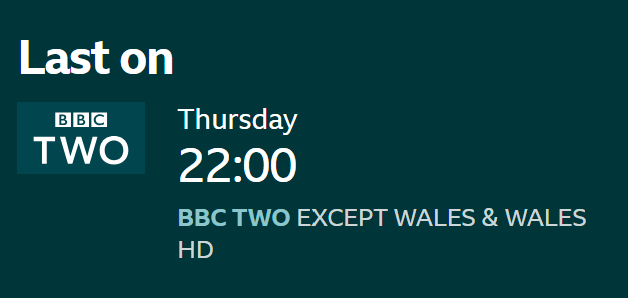
-
PC Wakes But Recording Doesn't Happen
Griga replied to Shaun White's topic in DVBViewer Media Server
I can see it in the svcdebug.log. Though the Media Server is running, there is not even an attempt to start the recording. Let's have a look at some events that happened lately: 17.12.25 18:43:14: The Media Server gets Windows a message that your PC is about to enter energy saving (sleep/standby) mode, so it sets up a wake time for the next recording at 18/12/2025 21:47:00 18.12.25 22:00:10: The PC wakes up, 13 minutes too late. Why? I can see no reason for it. Or does your PC need such a long time for getting up? (Some people do, but that's another thing). However, the Media Server still should start the recording, except if its duration is 13 minutes or less. But nothing happens at all. No more log entries until 19.12.25 03:15:11: There are three attempts to connect to the Web Server of your Media Server via the internet, two from China, one from the USA (I've entered the IP addresses in a "whois" service for finding out). The Media Server blocks these requests, because (luckily) it is configured for not allowing access from other networks but your home network. The blocking proves that your Media Server is still responsive. Nevertheless this is a bit weird, because usually the firewall in your router should already block such requests, but it doesn't, which means it it is configured to forward requests to port 8089 from outside to your Media Server. Did you induce that? Many connection attempts like that can be found in your log. The whole world seems to be interested in your Media Server. 19.12.25 06:30:39: The Media Server is stopped (manually by you, I guess). 19.12.25 06:31:20: The Media Server gets re-started, loads its timer list and finds a timer for a programme that is already completely in the past, which triggers the "Invalid timer" entry in the svcdebug.log. The missed recording is Inside No. 9: The Devil of... - ...Christmas. 1/6. Austria, Krampusnacht 1977. Who, 18/12/2025 22:45:00 Why does the Media Server set up a wake time at 18/12/2025 21:47:00 for it (almost 1 hour too early)? Why does the PC wake up too late (18.12.25 22:00:10)? However, this was still early enough for recording the programme, but why is the timer completely ignored by the Media Server? Unfortunately the log doesn't answer these questions. There are no errors whatsoever. The only possible reason I can think of for not executing a timer without any comment in the log is the timer being disabled.